Chat
Agentastic's structured agent conversations — the transcript, permission cards, steering and queueing, the pinned plan and sub-agent sidebars, attachments, and the Chat Options menu.
On this page
- Where Chat lives
- Which agents can chat
- Launch Interface
- Reading a transcript
- Full width
- Answering the agent
- Steering and queueing
- Suggested next steps
- Attachments
- When a Claude turn fails
- The plan sidebar
- The sub-agent panel
- Moving and sizing the panels
- The Chat Options menu
- Export
- Chat is a first-class agent
- Related
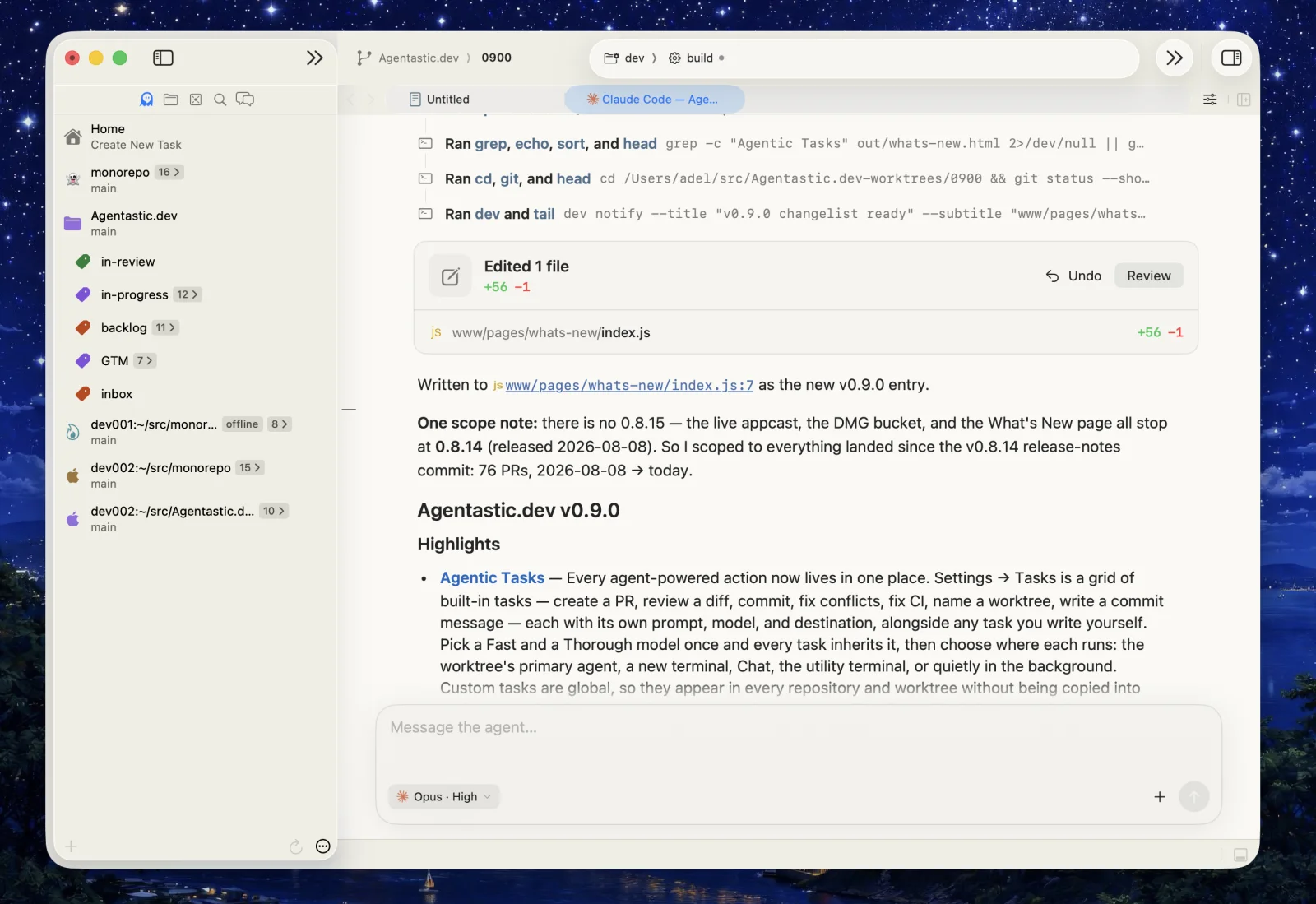
Chat is Agentastic's structured conversation surface. Instead of scraping a terminal for what an agent did, Agentastic speaks the provider's own protocol and renders real events: thinking, nested tool calls, plans, sub-agents, permission requests, and token usage.
The agent is still the provider's real CLI, running on your machine with your account. Chat is a better window onto it.
Where Chat lives#
A chat can occupy any surface in the window, and it keeps its live session when it moves.
| Surface | How to open it |
|---|---|
| Navigator panel | Cmd+5 — the Agent Chat panel |
| Utility area | The chat surface at the bottom of the window (Cmd+J) |
| Editor tab | Drag a running chat from either panel into the editor — center, split zone, or an exact tab position |
| Split | Cmd+D and Cmd+Shift+D work on chat tabs like any other tab |
Each panel keeps its own independent tabs, so several agent sessions can run in parallel in the active worktree. Promoting a chat to an editor tab carries the live session, model choice, and terminal with it — nothing restarts.
Panel chats, their selected tabs, display mode, and layout are saved across restarts and crash recovery, and a reopened chat lands where its reader left it rather than jumping to the end.
Which agents can chat#
Chat needs an agent Agentastic can drive over a structured protocol — 31 of the 55 catalog definitions today, each marked with a Chat chip on its tile in Settings → Agents.
| Transport | Agents |
|---|---|
| Native | Claude Code, Codex, Agentastic |
| Agent Client Protocol (ACP) | Prime Agent, Poolside, Command Code, Cursor, Grok Build, Qwen Code, Droid, Amp, OpenCode, GitHub Copilot, Auggie, Goose, Kimi, Kilocode, Devin, Kiro, Cline, Mistral Vibe, Hermes Agent, Junie, MiMo Code, Qoder CLI, Oh My Pi, CodeBuddy Code, Muse Code, Jcode, Yolop, fx |
Custom connections that resolve to one of these commands get Chat too. Overriding an agent's command turns Chat off for it, because Agentastic can no longer tell what it launched. Agents started by a scheduled task always open in Terminal.
ACP chats start the provider's own ACP server over stdio. Optional features — image attachments, session resume, mid-turn steering, slash commands, usage reporting, dynamic configuration — are negotiated with the provider when the session starts, so a chat only offers what that agent actually implements.
Launch Interface#
Every agent has a Launch Interface preference under Settings → Agents:
| Preference | Behavior |
|---|---|
| Terminal (default) | The agent runs in a real terminal; convert it to Chat at any time |
| Chat | The agent opens directly as a structured transcript from the first prompt, in the surface you launched from |
A direct Chat launch owns no hidden shell. Choosing Terminal on such a chat resumes that exact provider conversation in a real PTY and replaces the tab — nothing is lost, but the switch waits for the current turn to finish.
Reading a transcript#
- Tool calls collapse to one line each — a readable heading for the command or file, expandable to full input and output. Nested calls keep their hierarchy instead of flattening into noise.
- File links open the file — paths in the agent's prose and in tool arguments are clickable, resolve against the right worktree, and preview on hover.
- Edited-files card — one card per turn, below its final answer, listing every file the turn touched with its line counts, plus Undo and Review so you can reject a change or send it straight to a reviewer without leaving the chat.
- Mermaid diagrams render in place — see Markdown Documents.
- Thinking is separated from output, and streaming text lands smoothly rather than reflowing the whole pane on every token.
- Zoom (Cmd++ / Cmd+-) belongs to Chat and persists, so chats you read at a larger size stay that way. Agent Home and the Kanban board keep zoom levels of their own.
Full width#
Chat uses a centered reading column by default. Turn on Full width under Inspector → Agent Interface to let responses and the composer fill the available pane width. The preference updates every chat window immediately and is saved across restarts. Turn it off to restore the centered column.
The same toggle appears under Launch Interface in the Agent Home inspector when Chat is selected.
Answering the agent#
- Permission requests arrive as approval cards carrying the agent's own options — approve once, approve for the session, or reject — instead of a terminal prompt you have to guess at.
- Questions arrive as selectable choices. Anything the agent leaves open to freeform text you can simply type.
- Change permissions mid-conversation — the composer's permission picker moves a Claude Code chat between Plan, Ask every time, Auto, and Full access, so a chat that started in plan mode can go on to make the edits. Codex chats offer Plan, Ask for approval, Approve for me, and Full access. A change applies from the next turn, and switching to Full access also releases an approval the current turn is waiting on.
- Send the way you type — Return sends; every other Return chord opens a new line. Switch the send shortcut to ⌘ Return under Composer settings if you would rather keep Return for new lines.
Steering and queueing#
While an agent is working, sending adds your message to the visible queue. For Codex and ACP agents that advertise steering, hold Option while sending and the composer changes to Steer the current turn, delivering the message into the live turn. If that turn finishes first, the message falls back to the queue.
Queued messages can be edited, reordered, sent next, or deleted before the agent sees them. Set steering as your default under Composer settings — then Option queues instead, and agents that cannot steer keep queueing either way.
Native Codex chats steer through App Server's turn/steer request. Agentastic sends the active thread and expected turn identifiers with it, so a message cannot accidentally land in a newer turn when completion races with delivery.
Suggested next steps#
When a turn finishes, Chat can offer likely next prompts as small tiles above the composer: the answer to a question the agent just asked, a fix for failing CI on your pull request, or committing the work and opening a draft pull request. Hover a tile to read its full message, and click it to put that message in the prompt. Nothing is sent until you send it, so you can edit it first. Typing hides the tiles, clearing the prompt brings them back, and the next turn replaces them. The tiles share one line with the pins of closed panels; when they don't all fit, the line scrolls sideways, like a prompt's attachments.
Agentastic writes up to three with one short extra request on a private copy of the finished conversation, grounded in the repository's git and pull request state, the same way the Agentastic TUI does. Agentastic chats running on this Mac or in a worktree container offer them; remote and cloud chats don't yet. ACP agents that implement Agentastic's _agentastic.dev/follow_ups extension offer them too.
Claude Code 2.1.154 or later and Qwen Code suggest one each: the prompt they predict you'll type next, such as "run the tests". Each writes it with one short extra request of its own; Claude Code's reuses the conversation's prompt cache. Both skip turns where nothing is worth suggesting. Agentastic asks Claude only after seeing which version is installed, so the first Claude turn after Agentastic starts has no suggestion. Codex and the other agents don't offer suggestions yet.
Turn suggestions off under Composer settings. Qwen Code writes its suggestion either way; its own ui.enableFollowupSuggestions setting stops that.
Attachments#
Drag or paste images and files into the composer, or reference files with @. Image attachments are available where the provider negotiates support for them. Remote workspaces and cloud VMs carry attachments across to the machine the agent runs on; worktree containers don't accept attachments yet.
When a Claude turn fails#
If Claude answers with a 502 or bad-gateway error, or reports that the prompt is too long, Chat compacts the conversation (/compact) on the open session and resubmits your prompt once — the turn carries on instead of stopping. The transcript shows the recovery notice and the compaction, with the token count before and after. A failure after that is final and shown as the error. A 529 overload is a real capacity limit, so it is shown as-is and never compacted.
The plan sidebar#
When an agent publishes a plan, Agentastic pins it beside the transcript instead of burying it in scroll history. The panel sits outside the transcript's scroll view, so you can read back through the conversation without losing sight of what the agent intends to do next.
- The header shows progress as completed/total steps, and a mid-turn plan revision replaces the pinned plan immediately.
- Collapse it to a chevron, embed it back inside the chat, or close it entirely.
- Narrow panes fall back to the embedded layout automatically, even when you prefer the sidebar.
The sub-agent panel#
Agents that delegate — Claude's Task tool, Codex and Agentastic collaboration threads, ACP child sessions — get a live tree of their sub-agents.
- One line per sub-agent: its icon, the agent's name, and its task in parentheses. Each sub-agent keeps its own colored icon for the life of the conversation, and the first ten in a conversation never share one.
- An icon turns slowly while its sub-agent works, and holds still when Reduce motion is on. A word follows a row only when it needs a look: Needs input, Failed, Stopped, or Disconnected.
- Rows are grouped Active and Done, and nested agents are indented by depth.
- Click a row to open that sub-agent's own conversation, rendered with the same Markdown bubbles, work groups, and expandable tool rows as the main chat. Its icon and status sit beside its name, and the back chevron returns to the list.
- Child output and completion are isolated from the coordinator, so a chatty sub-agent cannot scramble the main transcript.
When a Codex or Agentastic coordinator finishes its turn while sub-agents are still working, the chat stays busy until they finish, and new messages wait in the queue. Agentastic confirms each one with the agent, so a sub-agent that has already finished never holds the chat open.
The panel is for monitoring. Delegation and control still happen through the parent agent — you ask the coordinator, not the child.
Moving and sizing the panels#
Both the plan and the sub-agent panel start embedded in the chat and can be ejected into a shared sidebar column beside the transcript.
| Action | How |
|---|---|
| Move to the sidebar / embed in chat | The arrow button in the panel's header |
| Resize | Drag the divider on the sidebar's left edge |
| Restore the default split | Double-click the divider |
| Close one | The × in the panel's header |
| Bring a closed one back | Click its pin above the prompt: Show sub-agents or View plan |
| Hide both | Turn off Show Chat Sidebar in the tab bar's Chat Options menu |
| Bring them back | Turn Show Chat Sidebar back on |
A closed panel leaves a pin on the line above the prompt with its live status: how many sub-agents are active, an orange Needs input when one is waiting on you, or the plan's progress. Clicking the pin opens that panel in the sidebar, or in the conversation when the pane is too narrow for one.
A sidebar opens on a fifth of the conversation pane, and its width is stored as that share rather than a point width — so the balance you picked survives a window resize, an editor split drag, or a change of Chat's zoom level. The transcript always keeps a readable prose column; the sidebar stops growing before it starves it.
The Chat Options menu#
The tab bar shows a Chat Options button whenever a direct Chat tab is active. The same items appear on the tab's right-click menu.
| Item | What it does |
|---|---|
| Primary Agent | Designates this chat as the worktree's Primary Agent, so reviews and design feedback route here |
| Terminal / Chat | Switches the display mode for this session |
| Show Chat Sidebar | Shows or hides the plan and sub-agent panels |
| Rename… | Renames the tab |
| Copy Working Directory | Copies the path as the agent process sees it — including remote and container paths |
| Reveal in Finder | Opens the worktree (local workspaces only) |
| Copy Chat Content | Copies a readable plain-text transcript, without raw provider payloads |
| Share… | Publishes the conversation — see Sharing Conversations |
| Mark as Seen | Clears the attention badge when the chat is waiting on you |
Export#
ACP chats add an Export menu that writes either a parsed transcript or a redacted protocol log — the latter is what to attach when reporting a provider bug.
Chat is a first-class agent#
A chat session registers with its worktree exactly the way a terminal agent does: it appears in the Inspector's Agents card and the sidebar's agent deck, it can be the worktree's primary agent, and it counts toward the worktree's activity indicators.
You can also start or continue a chat from the command line with dev agent task (and its dev agent submit alias), so scripts and automations can queue work into the right worktree's chat. See the System-wide dev CLI.
Related#
- Agent Home — launching agents and picking their interface
- Chats — chat with an agent without opening a project
- Manager Agents — long-running agents that run other agents
- Sharing Conversations — publish a transcript over a tunnel or to Agentastic
- Supported Providers — what each agent can do