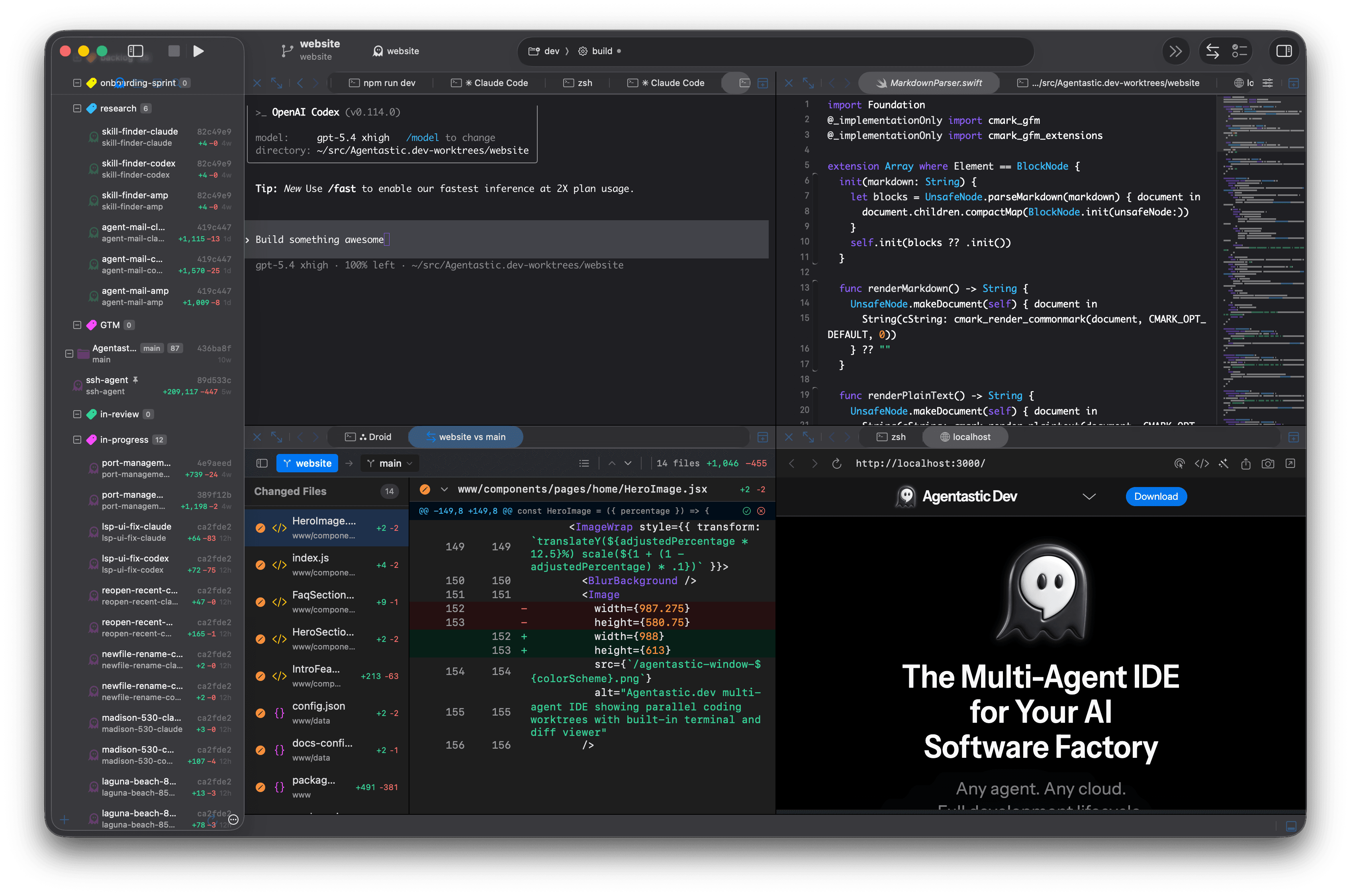
Multi-agent IDE for macOS
Run many coding agents without losing the codebase.
Agentastic.dev gives Claude Code, Codex, Gemini, Cursor, Copilot, Junie, OpenHands, and more their own isolated git worktrees, terminals, browsers, and diff reviews.
What makes an IDE multi-agent?
A multi-agent IDE is not just an editor with a chat panel. It is a control room for parallel software work: separate tasks, separate worktrees, separate terminals, separate browsers, and one review surface where you decide what lands.
Parallel agents
Launch several coding agents at once and keep their runs visible, resumable, and scoped to the task they own.
Worktree isolation
Each agent works in its own git worktree or container, so changes stay separated until you review and merge them.
Built-in review
Inspect diffs, compare agent output, and run code review before work reaches your main branch.
Multi-agent IDE vs AI editor vs agent terminal
Three kinds of tools now run coding agents. They overlap, but each is designed around a different unit of work, and that decides how well it handles several agents at once.
| AI editor | Agent terminal | Multi-agent IDE | |
|---|---|---|---|
| Built around | Your editing session, with an agent inside it | Terminal sessions you arrange yourself | Tasks: each one is an agent, a worktree, a terminal, and a diff |
| Parallel work | Varies; some editors now add background or cloud agents | You create and clean up worktrees, or script it | A worktree per task by default; containers, SSH hosts, or cloud sandboxes when you need more isolation |
| Agent choice | Mostly the editor’s own agent and model menu | Any CLI agent, one session at a time | Many CLI agents side by side, mixed per task |
| Review | Inline diffs in the open project | git diff and your own tools | A diff and review per task before anything merges |
| Examples | Cursor, Windsurf, Zed, VS Code with Copilot | Ghostty, iTerm2, Warp, cmux, tmux | Agentastic, Superset, Conductor, Orca, Nimbalyst |
Read the longer definition in what an agentic IDE is, or see how the tools stack up in the best agentic IDEs.
What to look for in a multi-agent IDE
- Isolation by default. Every task should get its own checkout so agents never edit the same files. Agentastic creates a git worktree per task and can move a task into a Docker or Apple container when files alone are not enough.
- Repeatable setup. A fresh worktree has no
node_modulesor.env. Look for setup and teardown hooks; Agentastic runs per-repository setup scripts. - The agents you already pay for. A multi-agent IDE should run your existing CLI subscriptions rather than resell a model. Agentastic ships built-in definitions for Claude Code, Codex, Gemini CLI, Cursor, Copilot, OpenCode, and dozens more, plus custom terminal agents.
- Attention, not tabs. With several agents running, you need to know which one is blocked on you. Notifications route that to you, and Agent Home launches and manages every run from one panel.
- Verification. UI work should be checked in a real browser attached to the task. Agentastic includes an agent-drivable browser.
- Review before merge. Each task needs its own diff, and a second agent should be able to review it. Code review runs Claude Code, Codex, CodeRabbit, Greptile, or Cursor Agent over the task's changes.
- Somewhere to run when the laptop sleeps. Remote SSH machines and cloud agents keep long tasks going.
- Programmatic control. Scripts, schedulers, and other agents should be able to start and steer work. See the dev CLI and agent orchestration.
A practical workflow for agentic development
Send one issue, bug, or experiment to each agent.
Give every run a clean branch and worktree.
Watch terminals, browsers, and task status in one app.
Review diffs and keep only the changes that earn it.
Automate the whole loop, from issue to merged pull request, and you have an AI software factory.
Bring the agents and editors you already use
Agentastic.dev is designed for the agent stack developers already have, not a single locked-in assistant. Pair it with your subscriptions, models, editors, and command-line tools.
- Claude Code
- Codex
- Gemini
- Cursor
- Copilot
- Junie
- OpenHands
- Hermes Agent
- Zed
- VS Code
- Xcode
- JetBrains IDEs
Compare multi-agent IDEs
- Best agentic IDEs — editor-first and agent-first tools side by side
- Best Claude Code GUI apps and best Codex GUI and desktop apps
- Agentastic vs Conductor, vs Superset, vs Orca, and vs Nimbalyst
- How to run multiple Claude Code agents in parallel
Multi-agent IDE FAQ
What is a multi-agent IDE?
A multi-agent IDE is a development workspace built for running more than one coding agent at the same time. Instead of sending every task to one assistant in one working tree, each agent gets its own isolated workspace, terminal, browser, and diff.
How is Agentastic different from an AI editor?
AI editors usually add chat, autocomplete, or one built-in agent to a single editor session. Agentastic is a native macOS workspace for launching many CLI agents in parallel and reviewing each result before you merge.
Can I keep using Cursor, Zed, VS Code, or Xcode?
Yes. Agentastic sits around your editor. You can open any agent worktree in Cursor, Zed, VS Code, Xcode, JetBrains IDEs, or a terminal.
Why use git worktrees for agents?
Git worktrees keep parallel agent changes separated. One agent can refactor a feature while another fixes a bug, and neither one tramples the other agent's files.
Is a multi-agent IDE the same as an AI software factory?
Not quite. The multi-agent IDE is where agents run and where you review their work. An AI software factory adds the rest of the line around it: intake from issues and schedules, remote and cloud compute, and pull-request merge. Agentastic.dev covers both.
What is the best multi-agent IDE?
It depends on your platform and how you work. For Mac developers who run several different CLI agents in parallel, Agentastic is built for that job. Superset, Conductor, Orca, and Nimbalyst are other multi-agent workspaces with different tradeoffs, and Cursor or Zed fit better if you mostly edit code by hand.
Is there a free multi-agent IDE for Mac?
Yes. Agentastic.dev is free on macOS 14 or later, on Apple Silicon and Intel. You pay agent vendors directly through your own subscriptions or API keys.
Can I run Claude Code and Codex in the same multi-agent IDE?
Yes. Agentastic runs Claude Code, Codex, Gemini CLI, and 50 more agent CLIs side by side, each in its own worktree, so you can hand the same task to two agents and compare the diffs.
How many coding agents can I run in parallel?
The practical limits are your machine’s CPU and memory, your providers’ usage limits, and how many diffs you can review well. Start with two or three independent tasks and add more once setup and review keep up.
Try Agentastic.dev on your next parallel coding session.
Free native macOS app. Bring your own agent subscriptions.