Conductor is joining Meta. Bring your work to Agentastic.
Keep your branches, unfinished changes, and choice of coding agents. Here is how to make the move.
On November 4, 2026, Conductor announced that it is joining Meta. The product is winding down, with different timelines for its cloud service and local Mac app. If you have branches in progress and a workflow built around Conductor, there is now a practical question: where do you continue that work?
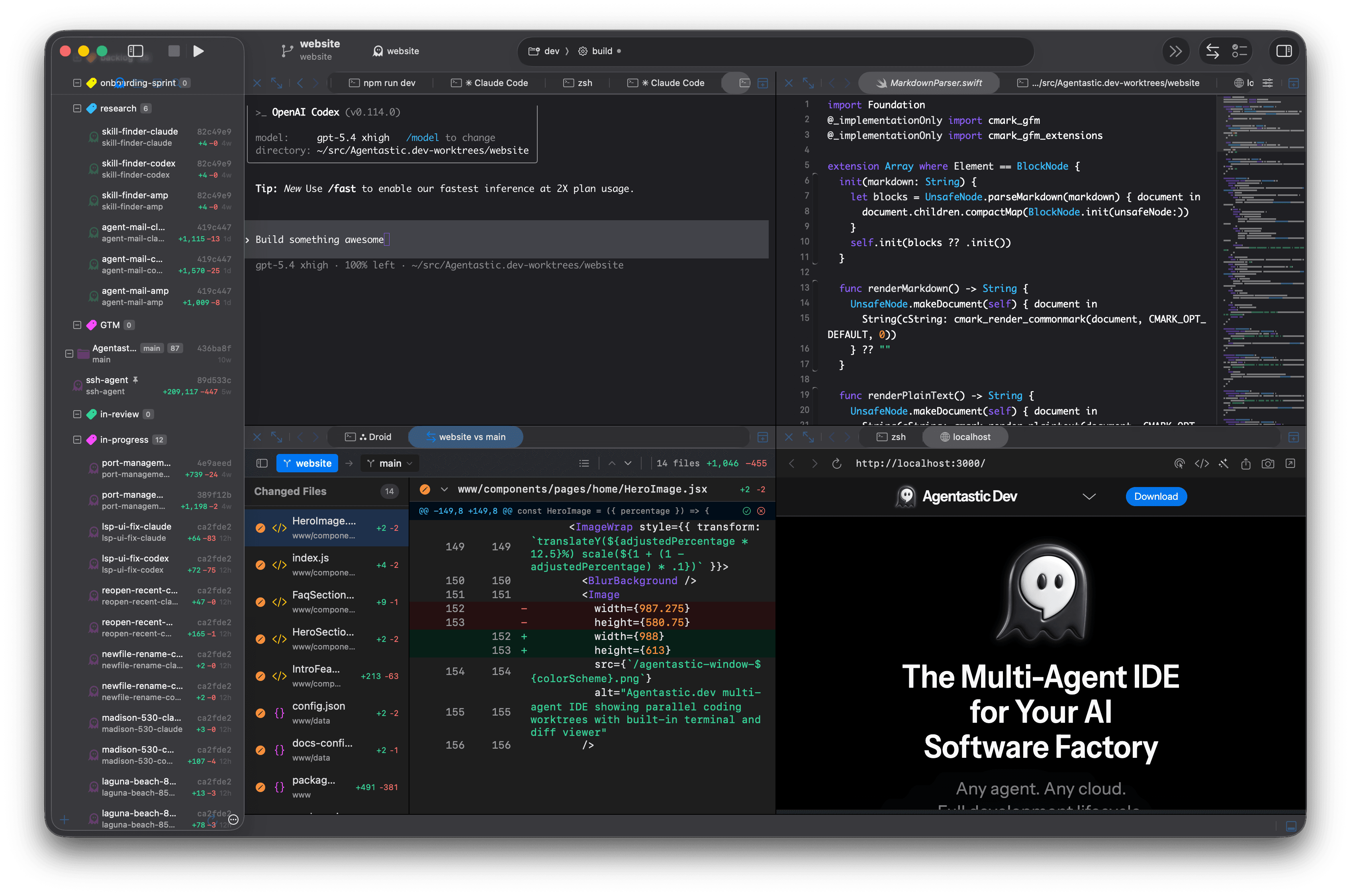
Agentastic.dev is a free, native Mac workspace for running coding agents in parallel, with a Conductor importer built in. You can bring over your local repositories and worktrees, keep their unfinished changes, and continue with Claude Code, Codex, or your preferred coding agent.
Here is what is changing, what Agentastic offers, and how to make the move.
What the Conductor acquisition means for users#
Conductor's official transition timeline separates the immediate cloud shutdown from the longer local-app transition:
| Date | What changes |
|---|---|
| November 4, 2026 | New sign-ups and app downloads close. |
| November 13, 2026 | Conductor Cloud becomes read-only. |
| November 20, 2026 | Conductor Cloud shuts down and deletion of cloud user data begins. |
| Early 2027 | Local Conductor begins winding down; new models and critical fixes continue until then. |
The local app is not stopping overnight. Cloud users have a more immediate reason to preserve their work. Conductor has provided export and transfer tools for that transition; use them before moving to another workspace.
Agentastic: a Conductor alternative for Mac#
If what you liked about Conductor was running several agents on separate tasks and reviewing their changes in one place, you can keep that way of working.
Agentastic brings your coding agents, Git worktrees, terminals, editor, browser, diffs, and pull requests into one native macOS app. Each new task can get its own worktree and branch, so agents work in separate checkouts while you follow their progress.
Use the agents you already know: Claude Code, Codex, Cursor, OpenCode, Gemini CLI, Amp, and many more. Run their terminal interfaces, or use structured chat with supported agents. Your provider accounts and subscriptions remain yours.
Beyond that familiar loop, Agentastic includes:
- Review in the workspace. Inspect changes in the diff viewer, run agentic code review, and open a pull request.
- A browser beside your code. Agents can inspect and test web apps in the built-in browser.
- A choice of execution environments. Use local worktrees, containers, SSH machines, or supported cloud providers on your own accounts.
- Coordination for ongoing work. Manager Agents can coordinate workers, maintain a wiki, and track objectives across a longer project.
- Approvals away from your desk. The iPhone companion, currently in TestFlight beta, lets you watch agents and answer them through an encrypted connection to your Mac.
Agentastic is free. You pay your agent providers and any cloud infrastructure you choose directly. The desktop app runs on Apple silicon and Intel Macs with macOS 14 or later.
How to move local Conductor workspaces into Agentastic#
Start with one workspace. You do not need to recreate your repositories or move every project at once. To see the whole import before you start, watch it on Moving from Conductor.
1. Install or update Agentastic#
Download Agentastic for Mac, or install the desktop app with Homebrew:
brew install agentasticai/tap/devUse version 0.16.2 or later, which includes Import from Other Apps…. Open it on the Mac that holds your Conductor workspaces.
Before importing, let agents finish or stop them in Conductor. Importing does not stop those processes, and you do not want two agents editing the same checkout.
2. Review your existing workspaces#
Choose File → Import from Other Apps…. Import is also available from the welcome screen and Settings → Workspaces.
Under Conductor, review the repositories and workspaces Agentastic finds. Check their paths, select the ones you want, and inspect any entries marked Needs review. You can also choose Follow new workspaces if you want Agentastic to discover new local Conductor workspaces during the transition.
Choose Bring it over to apply your selections.
Agentastic opens existing checkouts in place. Their files, branches, and uncommitted changes remain in the same directories. Names, pins, and reviewed archive state can come across too.
Keep those original folders. Agentastic is using them, not creating independent copies. Avoid deleting or archiving the same checkout from Conductor while you continue using it in Agentastic.
3. Review setup, archive, and run scripts#
The importer can offer supported commands from conductor.json or .conductor/settings.toml. Script configuration is unchecked by default: read the commands and warnings before selecting it.
Approved setup and archive commands become native configuration; supported run commands become run tasks. Import does not execute those commands or overwrite existing native configuration.
Agentastic also provides Conductor-compatible environment aliases, including CONDUCTOR_PORT, with a persistent block of ten ports per worktree. Check your dev server's configuration, especially hardcoded ports or named port declarations; allocating port numbers does not reserve sockets.
The Conductor migration guide covers compatibility and script details.
4. Start your agent and check the result#
Open an imported workspace, inspect its branch and changes, and launch your preferred agent. Install and authenticate the provider CLI if you have not already; Your First Agent walks through setup.
Conductor chats and running agents are not imported. If the agent CLI has a locally saved conversation, use its supported resume workflow from that checkout. Otherwise, start a fresh session with a short description of the task and ask the agent to inspect the current changes before continuing.
Authentication and permission grants need to be set up separately. Once the agent is running, review the diff, run your project's checks, and continue toward your pull request.
Moving from Conductor Cloud#
A cloud workspace needs an extra preservation step before local import.
Conductor's export instructions provide two actions: Settings → Account → Export data to download your data, and Transfer to local from a cloud workspace's right-click menu to move that workspace and its chats to your Mac.
Export your data and transfer the workspaces you want to continue. Check that each local checkout contains the branch and changes you expect. Inspect important untracked and Git-ignored files separately; a Git push alone does not preserve those files.
Then import the local workspace into Agentastic. Your exported conversations remain a record you can keep; Agentastic does not import them as chats.
If you want to run remotely again, configure an SSH machine or a supported cloud account in Agentastic. This is a new execution environment: dependencies, configuration, and credentials need their own setup. Test a small task and how its changes return before relying on unattended work. Remote sessions can continue while your laptop sleeps, subject to the host's lifetime and idle settings.
Keep building from the work you have#
Changing your workspace should not require throwing away a half-finished branch or changing every agent you use.
Start by bringing over one local Conductor workspace. Check the changes, run your agent, and take the next task through review. You can explore containers, remote execution, and Managers when you need them.
Download Agentastic for Mac or follow the step-by-step Conductor migration guide. If a workspace is missing or a script needs attention, email hi@agentastic.ai.
Frequently asked questions#
Is Conductor shutting down after the Meta acquisition?#
Conductor has announced a wind-down. Cloud becomes read-only on November 13, 2026, and shuts down on November 20, when cloud data deletion begins. The local app continues receiving new models and critical bug fixes until early 2027. See Conductor's official announcement for the transition timeline.
Can I import Conductor workspaces into Agentastic?#
Yes. Choose File > Import from Other Apps… in Agentastic and review your local Conductor repositories and worktrees. Selected checkouts open at their existing paths, keeping their branches, files, and uncommitted changes. Remote and sandbox-hosted workspaces must be brought local separately.
Does Agentastic import Conductor chat history?#
No. The importer does not transfer Conductor chats or running agents. Export your Conductor data to preserve conversations. If your agent CLI saved a session locally, use that CLI's supported resume workflow from the imported checkout; otherwise start a fresh conversation.
Is Agentastic free, and can I keep my agent subscriptions?#
Agentastic.dev is free to use. Run supported agent CLIs with your existing provider accounts or API keys; you continue paying those providers directly. Cloud compute is billed by the infrastructure provider you choose. The desktop app requires macOS 14 or later.