Give your coding agents a desktop
Computer use lets an agent see a screen and move a mouse. Here is why that was hard, which models do it best in October 2026, and how to make one build, click through, and record your app in Agentastic.dev.
Most coding agents can run your tests. Few can use your app. Give one a bug report that says "the dialog stays on Starting after you click Install," and the agent can read the Swift, guess at the cause, and write a fix. It cannot press the button. Agentastic.dev 0.15 adds that missing sense: a Computer tab in which agents see a real desktop, click and type in it, and record what happened, next to the browser and device tabs they already had.
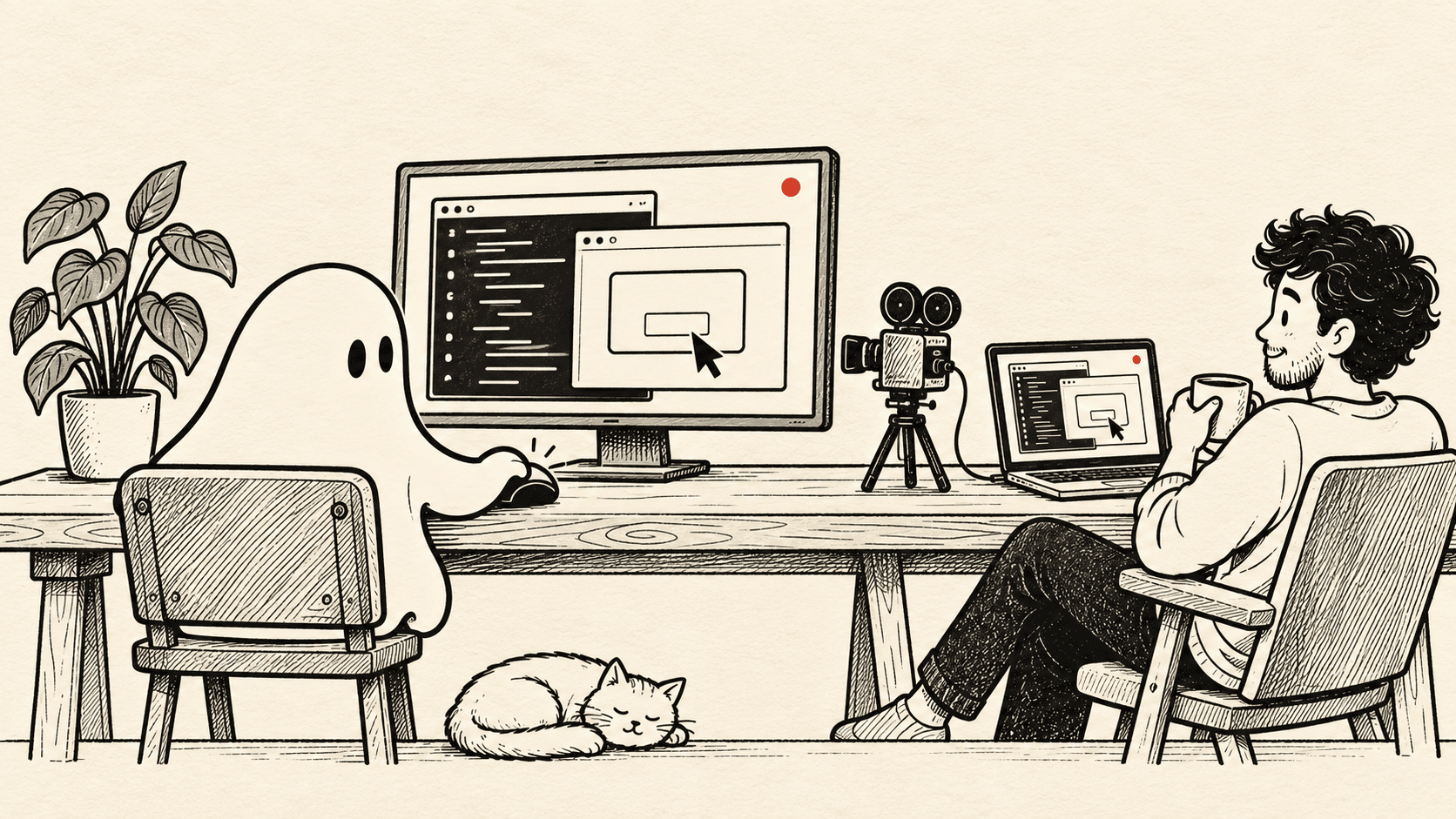
This post is about the whole topic, not only the feature: what computer use is and how it differs from browser use and device use, why it took the field two years to cross the human baseline on a 369-task benchmark, which frontier models lead in October 2026 and which one to use today, and the prompts that make computer use useful for development work.
The short version#
- Computer use means an agent operates a computer through screenshots, the mouse, and the keyboard, so it can test anything with a screen: native apps, Electron windows, installers, system dialogs.
- Models now beat people on short desktop tasks. On OSWorld's 369 tasks, a single model passed the human baseline in April 2026, and the best now completes 86.0%.
- They can't yet finish long work alone. On Agents' Last Exam, 122 professional tasks in real software, the best agent finishes 45.9% end to end.
- What to use today: Claude Opus 5.5 in Claude Code for the hardest GUI flows, GPT-6.1 Terra in Codex for cheap, fast runs you repeat, and GPT-6 Astra if you work in Codex and want OpenAI's strongest. Gemini 4 Carbon leads the newest leaderboards but isn't open to developers yet. The reasoning is below.
- That is the right size for testing. In Agentastic.dev, any of those agents can drive a Mac, a Linux desktop, or a VM with
dev computer, hand control to you when it should, and leave a video of what it did.
What is computer use?#
A computer-use agent operates a machine through the same interface a person does. It receives a screenshot, decides what to do, sends a mouse or keyboard event, and looks again. No API, no DOM, no test IDs. The loop is simple to describe and brutal to run well:
- Observe. Take a screenshot (and, where available, an accessibility snapshot of windows and elements).
- Ground. Turn "the Install button" into a coordinate on that screenshot.
- Act. Click, type, press a chord, scroll, or drag.
- Verify. Take another screenshot and check that the thing you expected actually happened.
Anthropic shipped the first frontier-model version of this as a public beta in October 2024, with Claude 3.5 Sonnet scoring 14.9% on OSWorld from screenshots alone and 22.0% when allowed more steps (Anthropic). OpenAI followed in January 2025 with its Computer-Using Agent at 38.1% (OpenAI). Both announcements said the same thing in different words: the capability is real, and it is not reliable yet.
Two years later it is the headline feature. OpenAI introduced GPT-6 Astra in September as its best computer-use model (OpenAI), and on October 26 it released GPT-6.1 Terra, a cheaper model built around the computer work that fills a day: forms, invoices, video edits (OpenAI). Anthropic says Claude Opus 5.5 leads its own tests on computer use (Anthropic), and Google and Meta publish computer-use results for Gemini 4 and Muse Wonder.
Browser use, device use, computer use#
Agentastic ships all three as skills, and they are not interchangeable. The difference is what the agent sees and what it is allowed to touch.
| Browser use | Device use | Computer use | |
|---|---|---|---|
| What the agent sees | The page's accessibility tree and DOM, plus screenshots | The app's accessibility tree, plus screenshots | Screenshots of the whole screen; on a Mac, Cua's window and element overview |
| How it targets things | @e3-style element references, CSS selectors | Element references and labels | Pixel coordinates on the last screenshot |
| What it can reach | One browser tab and its console, cookies, dialogs | One iOS Simulator or Android Emulator | Every window on the desktop, installers, system dialogs, other apps |
| Where it runs | The built-in browser, or headless Chromium on a remote host | The simulator on the agent's execution host | The Mac's own desktop, a Linux virtual desktop, or a VM over VNC |
| Best for | Web apps and anything with a URL | Mobile apps | Native and Electron apps, cross-app flows, "test it like a user" |
| Command | dev browser | dev device | dev computer |
The rule of thumb our computer-use skill gives agents: if it has a URL, use the browser; if it runs in a simulator, use the device; otherwise use the computer. Browser use is faster and more exact because it reads structure instead of pixels. Computer use is the fallback that works for everything, at the cost of being slower, costing more tokens, and asking the model to do the hardest part, grounding, by eye.
Why it is hard#
The screenshot-and-click loop hides four problems, and the benchmarks that measure them tell the story of the last two years.
Grounding. The agent has to turn "the gear icon next to the project name" into an x, y pair, on a high-resolution screen, in an app it may never have seen. In 2024 the OSWorld paper named this, along with knowing how applications work, as the main reason agents failed. ScreenSpot-Pro, a benchmark of exactly that task across 23 professional applications, found the best model at 18.9% when it launched in early 2025 (ScreenSpot-Pro). By September 2026 OpenAI reported GPT-6 Astra at 92.7% on the same test with no tools (OpenAI). For frontier models, grounding is close to solved.
Stale observations. A screenshot is a fact about the past. Between the capture and the click, a dialog can appear, a progress bar can finish, a window can move. OSWorld 2.0 tags this as "streaming interaction" and lists it among the challenges agents handle worst (OSWorld 2.0). Agentastic's CLI deals with it mechanically: every action carries the generation of the screenshot it was based on, and an action against a stale generation is refused until the agent looks again.
Horizon. OSWorld's original tasks take about 30 tool calls. OSWorld 2.0's workflows averaged 318 in the paper's runs, and a skilled person needs a median of 1.6 hours per task (OSWorld 2.0). The paper's finding is blunt: completion falls as task length grows, and past about 163 minutes of human time every model's strict completion rate was zero. A later study of error recovery explains why: an early wrong action gets written into a file, a spreadsheet, or a database, and every later step builds on it (CUA-Recovery).
Hidden state. The hardest OSWorld 2.0 phenomena are not about clicking at all. They are inferring state the instruction never mentions, tracking many items at once, deciding which of two contradictory sources is authoritative, and noticing that a new message changed the job (OSWorld 2.0). Agents guess rather than ask, and skip verification. Those are judgment failures, and they are why "most of the task done" is the normal outcome.
There is a fifth problem that completion scores do not capture: a desktop is a shared, mutable, sometimes dangerous place. Prompt injection through screen contents is the setting where Anthropic measures its highest attack success rate for Opus 5.5, 2.8% at fifteen attempts, against 0.5% in coding (Opus 5.5 system card). A click on the wrong dialog is not undoable with git checkout. Any serious computer-use product needs human takeover, a pause, and evidence of what the agent did, and we will come back to how Agentastic handles each.
Why it matters#
The economic argument is the one the benchmark authors make. OSWorld 2.0 maps its 108 tasks to occupations and, by a wage-bill proxy, puts the work they stand in for at $1.64 trillion (OSWorld 2.0). Agents' Last Exam, a benchmark built with more than 250 industry experts, argues that strong benchmark scores have not turned into economically meaningful deployment because the benchmarks never measured sustained work on real workflows (Agents' Last Exam). Both are bets that the gap between "can code" and "can work" is mostly the gap between a terminal and a screen.
For developers the argument is narrower and more immediate. The thing you built has an interface. Unit tests check the parts; the browser skill checks web pages; the device skill checks a phone. The desktop app, the installer, the menu bar item, the onboarding sheet, the Electron window and its native file dialogs, the export that has to open correctly in another program: none of those had an agent-reachable test surface until the agent could use the computer. Computer use closes the loop between "I changed the code" and "I watched it work," and it does so without you sitting in the chair.
The companies building agents for a living say the same. When OpenAI launched GPT-6 Astra, Cognition, which makes Devin, said its computer use "improved testing right out of the box: videos are noticeably easier to follow" (OpenAI).
Where the models stand#
Three kinds of evidence tell the story: the original OSWorld, which the models have outgrown; the long-workflow benchmarks where the frontier now competes; and an independent lab that runs every model the same way.
OSWorld: the human baseline fell in 2026#
OSWorld, from the University of Hong Kong's XLANG Lab, runs an agent on a real Ubuntu desktop across 369 tasks in Chrome, LibreOffice, GIMP, Thunderbird, VS Code, VLC, and the OS itself, then checks the final state of the machine with a script (OSWorld). People completed 72.36% of the tasks. The best agent in the April 2024 paper completed 12.24%.
Two and a half years on OSWorld
The best score on 369 real desktop tasks, against the people who set the baseline. Scroll to move through time.
Best reported OSWorld success rate from April 2024 to August 2026, against a human baseline of 72.4%.
- April 2024: OSWorld launches. People complete 72.4% of its 369 desktop tasks; the best agent completes 12.2%.
- October 2024: Anthropic adds computer use to its API. Claude 3.5 Sonnet completes 22.0%, given 50 steps.
- January 2025: OpenAI’s Computer-Using Agent reaches 38.1%.
- July 2025: The tasks are repaired and re-released as OSWorld-Verified. From here, each dot is one leaderboard entry.
- December 2025: An agent framework that makes ten attempts per task edges past the human baseline: 72.6%.
- April 2026: A single model passes it: Kimi K2.6 at 73.1%. Claude Sonnet 4.6 had stopped a quarter point short in March.
- August 2026: Claude Fable 5 reaches 86.0%, and 16 entries now sit above the human baseline.
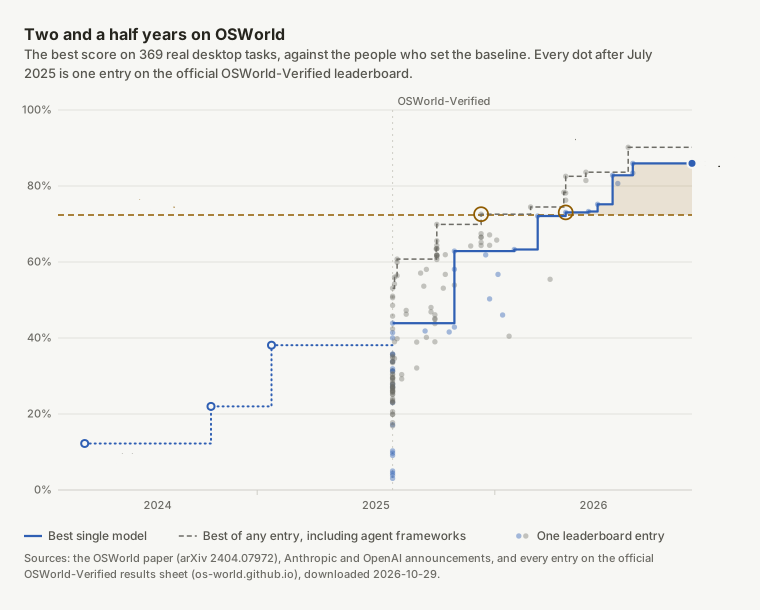
Every dot is an entry on the official leaderboard, 144 of them since the maintainers repaired the tasks and relaunched the benchmark as OSWorld-Verified in July 2025. Before that, the chart has three milestones on the original task set: the paper's 12.24%, Claude 3.5 Sonnet's 22.0% in October 2024, when Anthropic put computer use in its API, and OpenAI's Computer-Using Agent at 38.1% in January 2025. The two task sets aren't strictly comparable, but the trend doesn't depend on that detail.
The human baseline fell in two steps. In December 2025 an agent framework that runs ten attempts per task and picks the best one reached 72.58%. Claude Sonnet 4.6 came within a quarter of a point in March 2026, and in April Kimi K2.6 became the first single model above the line, at 73.06%. By August, Claude Fable 5 had reached 86.0% and an agent framework, Intelligence-Indeed, 90.2%. Sixteen entries now sit above the human baseline: seven single general models, seven frameworks, and two runs of H Company's computer-use model Holo3.
Two reads of this chart. First, grounding and short-horizon planning are largely solved: on tasks like these, a frontier model now completes more than the people who set the baseline. Second, OSWorld can no longer rank the frontier. None of this autumn's releases, Claude Opus 5.5, GPT-6 Astra, the Gemini 4 models, or Muse Wonder, appears on its leaderboard; their makers report on longer tests instead.
The frontier on one leaderboard: Agents' Last Exam#
The one public leaderboard with every current frontier model on it is Agents' Last Exam. Its 122 tasks come from real projects in 13 industries and run in the real software: routing a circuit board in KiCad, animating in Adobe After Effects, modeling a part in Siemens NX, building a scene in Unreal Engine (Agents' Last Exam). They are long: the leading run took 157 hours of agent time across the suite, more than an hour per task. Each model runs inside an agent, mostly its maker's own. Claude Code, Codex, and Muse Code are agents Agentastic runs, so this is close to what you get at your own desk; Google's models ran in the benchmark's reference harness.
The frontier on Agents’ Last Exam: credit earned versus tasks finished
122 professional tasks in real desktop software, each model running in an agent harness. Each bar is the credit an agent earned; the blue part is the tasks it finished end to end.
| Model and harness | Score with partial credit | Tasks finished end to end |
|---|---|---|
| Gemini 4 Carbon, ALE-Claw, high | 77.4% | 45.9% |
| Kimi K3.1 Pro, Kimi Code, max | 74.4% | 43.4% |
| Claude Opus 5.5, Claude Code, max | 71.6% | 43.4% |
| GPT-6 Astra, Codex | 73.1% | 42.6% |
| GPT-6.1 Terra, Codex, max | 69.8% | 41.8% |
| Gemini 4 Argon, ALE-Claw, high | 69.0% | 40.2% |
| Muse Wonder, Muse Code, high | 68.4% | 38.5% |
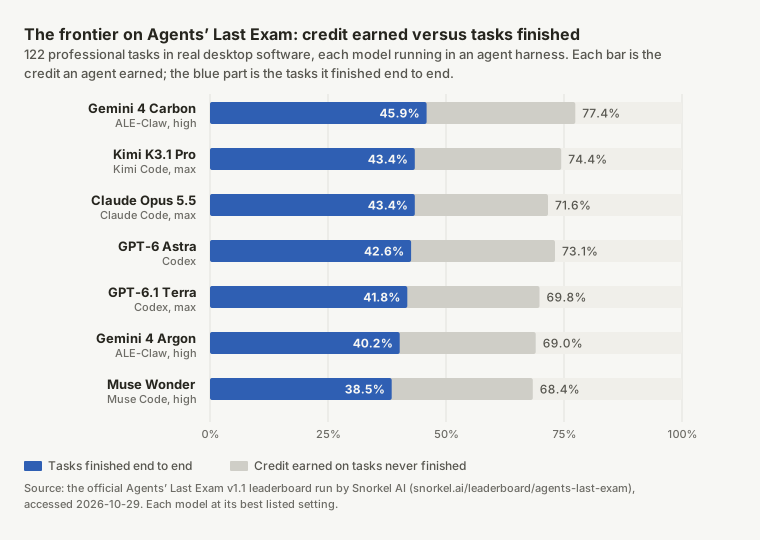
Gemini 4 Carbon leads, finishing 45.9% of the tasks and earning 77.4% of the available credit. The next four finish between 41.8% and 43.4%, close enough that the order could change with the next run, so look at what else differs. GPT-6 Astra used 5.1 million output tokens across the suite; Claude Opus 5.5 used 21.5 million, four times as many, to finish 0.8 points more. Kimi K3.1 Pro tied Opus 5.5 in less than half the agent time, 61 hours against 134. And OpenAI says GPT-6.1 Terra matches Astra at medium effort for a tenth of the price per token, and costs about a ninth as much per task as Opus 5.5 at max effort (OpenAI).
The gap between the light bars and the blue ones is the same everywhere: every model earns most of the credit and finishes fewer than half of the tasks.
OSWorld 2.x: most of a workflow is not the workflow#
OSWorld 2.0 has 108 tasks across seven professional domains, 31 self-hosted websites so email, banking, and team chat behave deterministically, authentic input files, a simulated user who can be asked questions, and partial credit across an average of 27 checkpoints per task (OSWorld 2.0). The headline metric is strict completion: every checkpoint passed.
Its public leaderboard, run by Snorkel AI, hasn't added this autumn's models yet (Snorkel AI). Their makers report OSWorld 2.1, which includes the authors' fixes, mostly on its offline subset: the 82 of its 108 tasks that run without internet access. Here the numbers need care, because the same model appears with different scores depending on who ran it and on which task set:
| Model | OSWorld 2.1, offline subset | Other published runs | Gap65–90% scale |
|---|---|---|---|
| Claude Opus 5.5; 5.4 points between its two scores | 87.2% partial, 53.2% strict (Anthropic; Google lists the same) | 81.8% (Anthropic launch post, different task set) | |
| Claude Sonnet 5.5; 3.8 points between its two scores | 83.9% partial, 48.8% strict (Anthropic) | 80.1% (Anthropic launch post, different task set) | |
| Gemini 4 Carbon; one published score | 81.5% (Google, best of three runs) | — | |
| GPT-6 Astra; 8.3 points between its two scores | 80.9% (Google) | 72.6% (OpenAI, OSWorld 2.0 offline set); 75.8% (Meta) | |
| Claude Fable 5.1; 3.9 points between its two scores | 76.8% (Google) | 80.7% (Anthropic, different task set) | |
| Gemini 4 Argon; 5.5 points between its two scores | 74.7% (Google, best of three runs) | 69.2% (Google, OSWorld 2.0 offline set) | |
| Muse Wonder; one published score | — | 72.6% partial, 34.3% strict (Meta, its own run of OSWorld 2.1) |
Sources: Anthropic's Haiku 5.5 system card and launch posts for Opus 5.5 and Sonnet 5.5; Google DeepMind's Gemini page, Gemini 4 Carbon evaluation notes, and Gemini 4 Argon model card; OpenAI's GPT-6 Astra post; Meta's Muse Wonder model card. All checked October 29, 2026. Partial credit unless marked strict.
Anthropic's September launch posts put Opus 5.5 at 81.8% and Sonnet 5.5 at 80.1%. Its Haiku 5.5 system card later re-ran both on the benchmark's official offline subset, averaging five attempts per task, and reported 87.2% and 83.9%. Google's Gemini 4 table lists the same 87.2%, above Google's own Gemini 4 Carbon at 81.5%, even though Google scored its own models on the best of three runs. GPT-6 Astra has three published numbers: 72.6% from OpenAI on the older 2.0 offline set, 75.8% in Meta's run, and 80.9% in Google's table.
The gap column shows how far apart one model's own numbers sit: up to 8.3 points, more than the 5.7 points between first and third place on the shared test. The test itself is still settling, too: in September, Epoch AI audited 50 of OSWorld 2.1's tasks and found errors in 36 of them (Epoch AI). So compare models within one column, read the strict pass rate when it's published, and treat a few points either way as a tie. Anthropic itself wrote that at these levels benchmark margins have become a weaker guide to real-world differences (Anthropic).
The independent view: Artificial Analysis#
When vendor tables disagree, it helps to have one lab run everyone the same way. For general capability that lab is Artificial Analysis, though not for screens: as of October 29 it runs no screenshot-and-click benchmark. Its Intelligence Index v5 runs every model the same way on nine evaluations of knowledge work, coding, science, and general knowledge, with 60% of the weight on private test sets, and records what each task costs (Artificial Analysis).
The independent view: capability against cost
Artificial Analysis Intelligence Index v5, which runs every model the same way on knowledge work, coding, and science, against the cost of one index task. Up is more capable; left is cheaper.
| Model and setting | Intelligence Index | Cost per task |
|---|---|---|
| Gemini 4 Carbon (high), not yet available to developers | 59 | $7.76 |
| Claude Opus 5.5 (max) | 58 | $10.04 |
| GPT-6 Astra (max) | 57 | $6.24 |
| GPT-6.1 Sol (max) | 55 | $1.27 |
| Claude Sonnet 5.5 (max) | 54 | $10.02 |
| GPT-6.1 Terra (max) | 51 | $0.96 |
| Gemini 4 Argon (high) | 50 | $7.68 |
| Kimi K3.1 Pro (default) | 46 | $3.68 |
| Muse Wonder (max) | 43 | $6.95 |
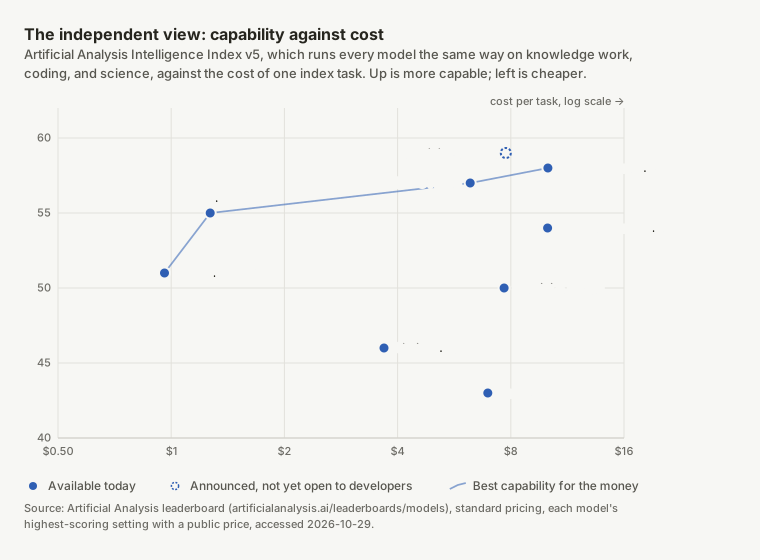
Gemini 4 Carbon took first place on October 28 at 59, one point ahead of Claude Opus 5.5 at 58 and two ahead of GPT-6 Astra at 57 (Artificial Analysis). Its Coding Agent Index, which runs whole agents rather than bare models, has Claude Code with Opus 5.5 first at 62 and Carbon three points behind. The cost axis is where the choice gets interesting: GPT-6.1 Terra scores 51 for $0.96 a task and GPT-6.1 Sol 55 for $1.27, against $10.04 for Opus 5.5. Among models you can use today, the line of best value runs from Terra through Sol and Astra to Opus 5.5.
Everything else: solved, almost solved, and barely started#
Short tasks are solved. Long ones are not.
The best published score when each benchmark launched, and the best today.
| Benchmark | At launch | Best today | Human baseline |
|---|---|---|---|
| OSWorld | 12.2%, best agent in the paper, Apr 2024 | 86.0%, Claude Fable 5, official leaderboard, Aug 2026 | 72.4% |
| WebArena | 14.4%, best GPT-4 agent in the paper, Jul 2023 | 74.3%, WebTactix, best open entry, Feb 2026; 86.1% claimed by Narada AI, submitted by its team without public trajectories | 78.2% |
| AndroidWorld | 30.6%, best agent in the paper, May 2024 | 100.0%, 5 systems tie, self-reported, Aug 2026 | 80.0% |
| ScreenSpot-Pro | 18.9%, best grounding model in the paper, Jan 2025 | 92.7%, GPT-6 Astra, reported by OpenAI, Sep 2026 | Not published |
| OSWorld 2.x (strict) | 20.6%, best agent in the OSWorld 2.0 paper, Jun 2026 | 53.2%, Claude Opus 5.5, 2.1 offline tasks, Oct 2026 | Not published |
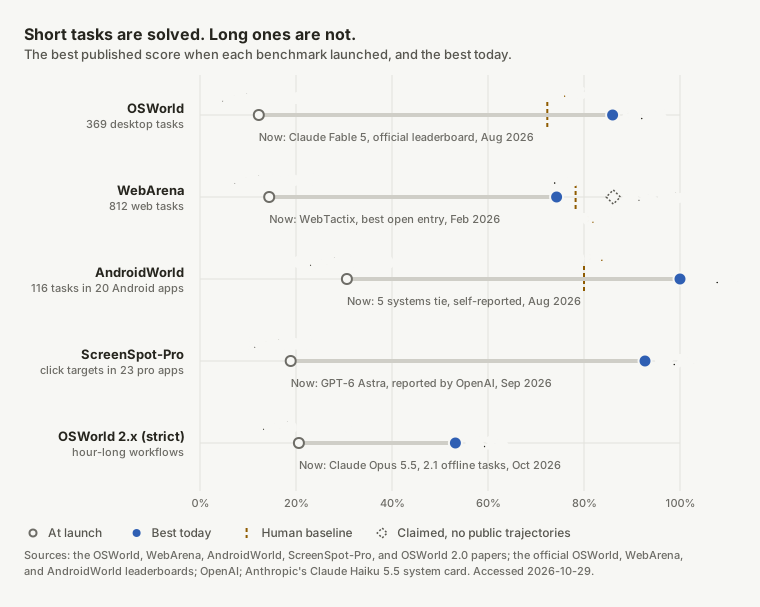
The pattern across benchmarks is the same one OSWorld shows alone. Tasks that fit in a few dozen steps are at or near human level: OSWorld at 86.0% against 72.36%, ScreenSpot-Pro grounding at 92.7%, and WebArena's 812 self-hosted web tasks at 74.3% for the best open entry against a 78.24% human figure (WebArena). WebArena's official sheet now has a higher row, 86.1% from Narada AI, submitted by its own team in September; as of mid-October it named no model and published no trajectories (Narada AI, PersonalAgentBench), so the chart marks it separately.
Phones got there first. AndroidWorld's 116 tasks across 20 real Android apps started at 30.6% in May 2024, against 80.0% for people (AndroidWorld). Agent systems on its community leaderboard, which warns that it verifies nothing, passed the human figure by October 2025, and five now report 100% (AndroidWorld leaderboard).
Work that takes a person an hour or more is where agents stop. The best strict score on OSWorld 2.1's offline tasks is Claude Opus 5.5's 53.2%, against 20.6% in the OSWorld 2.0 paper in June, and the best agent on Agents' Last Exam finishes 45.9%. For a developer the practical translation is: an agent will reliably click through a flow you can describe in a paragraph, and will need checkpoints, evidence, and a human in reach for anything longer. That is exactly the shape of a test.
Which model to use today#
Benchmarks narrow the field; they don't pick for you. The top five on Agents' Last Exam are within 3.3 points of each other, and one model's published scores move by more than that from one lab's run to the next. So choose by the agent you already use, how often the test runs, and what a run costs. Here is where we would start in October 2026:
| If you want | Use | Agent in Agentastic | Why |
|---|---|---|---|
| The best results on long GUI flows | Claude Opus 5.5 | Claude Code | Highest published OSWorld 2.1 score, 87.2% of the credit and 53.2% of tasks finished, first even in Google's table; leads the Artificial Analysis Coding Agent Index |
| Cheap, fast runs you repeat every night | GPT-6.1 Terra | Codex | Finishes 41.8% of Agents' Last Exam, 1.6 points behind Opus 5.5, at $1 and $5 per million tokens; $0.96 per Artificial Analysis task |
| OpenAI's strongest computer-use model | GPT-6 Astra | Codex | 92.7% on ScreenSpot-Pro grounding; 42.6% on Agents' Last Exam with a quarter of the output tokens of Opus 5.5 |
| Speed among the leaders | Kimi K3.1 Pro | Kimi | Ties Opus 5.5 at 43.4% on Agents' Last Exam in less than half the agent time |
| Meta's agent | Muse Wonder | Muse Code | 38.5% on Agents' Last Exam and 72.6% partial on OSWorld 2.1 in Meta's run; Muse Wonder Full scores higher for Muse Code subscribers |
| Google's model today | Gemini 4 Argon | Gemini CLI | 40.2% on Agents' Last Exam; computer use is in preview in the Gemini API |
| The current leader | Gemini 4 Carbon | Not yet available | Leads Agents' Last Exam at 45.9% and the Artificial Analysis index at 59, but only Google's Fairwind partners have it (Google) |
Prices and rankings move monthly; these are as of October 29, 2026. Agentastic 0.15 added GPT-6.1 Terra to the Codex model picker.
The model matters less than the loop around it, and you don't have to take a leaderboard's word for any of this. Agentastic's computer-use skill and dev computer work the same with every agent above, so you can settle it on your own app: open two worktrees with a Linux computer each, give Claude Code on Opus 5.5 and Codex on GPT-6.1 Terra the same test prompt, and compare the two recordings and what each run cost.
Computer use for development work#
Here is what changes in practice. An agent in Agentastic can already build your project, run the tests, and open a pull request. With a computer it can also run the thing, go through the flow a user would, reproduce the bug from the ticket, and leave a video. The whole loop runs without you, and you get a recording and a proof manifest rather than a sentence that says "verified."
In that clip the agent is Agentastic's own CLI on GPT-6.1 Sol. It opens a fresh Linux desktop on a remote host, launches Chrome, and downloads the installer from agentastic.dev in seventeen steps and under thirty seconds of agent time, then stops the recording and reports back with the MP4 on disk.
Prompts that work#
Computer-use prompts are test plans. The good ones name the target, say what "done" looks like on screen, ask for specific evidence, and draw a line the agent must not cross. Each of the following is a real shape of task; swap in your own app.
Reproduce it, fix it, and prove it, without you at the keyboard. This is the one to start with: the whole cycle from bug report to verified fix, with a video at each end.
Bug report: after renaming a worktree, the sidebar keeps showing the old name
until the app restarts.

1. Build and launch the app. Use computer-use to reproduce the bug on this Mac,
   and record it.
2. Find the cause, fix it, and add a test that fails without the fix.
3. Rebuild, repeat the same steps, and record again.
4. Report what you saw before and after, with both video paths and the proof
   manifest. Don't open a pull request until I've watched the videos.
Reproduce a bug from a ticket, and only that.
Build the app with `bazel run //CodeEdit:run`. Then use computer-use to
reproduce the bug in the ticket: open Settings → Computer Use, click "Install
Cua Driver", and watch the status text. Record the whole attempt. Tell me
whether the bug reproduces, give me the MP4 path and a screenshot of the final
state, and stop recording before you write the summary. Don't change any code.
Smoke-test an Electron app on a fresh Linux desktop.
Open a new Linux computer and launch the app with `dev computer launch -- npm
run electron`. Run the onboarding flow: create a workspace named "smoke", add
one note, quit, relaunch, and confirm the note is still there. Screenshot
after each step. If a dialog you don't recognize appears, hand off to me
instead of guessing.
Make the release-notes GIF.
On the Linux desktop, open Chrome, go to agentastic.dev/download, and download
the macOS installer. Record it and produce a GIF under 15 seconds for the
release notes. Don't type anything into the browser other than the URL.
Compare before and after.
Check out main in a second worktree and build both. In each build open the
diff viewer on the same file at the same window size and take a screenshot.
Publish both side by side as an artifact and point out every visible
difference other than the new toolbar icon.
Verify across applications.
Export the report from the app as CSV, open it in LibreOffice Calc on the same
desktop, and check that the totals row equals the sum of the column.
Screenshot the spreadsheet. Say what you observed, not what you assume.
Keyboard-only accessibility pass.
Without using the mouse, tab through the New Task sheet and verify every
control is reachable and the focus ring is visible. Use `dev computer key`
only. Screenshot any control you can't reach, then hand the sheet back to me.
Never confirm a destructive dialog alone.
Test "Delete workspace" on the throwaway workspace "scratch-01" only. Before
you confirm any destructive dialog, take a screenshot and hand off to me. Wait
until I return control.
Run it every night. Put the same prompt in a scheduled task and you have a GUI smoke test that leaves a video. This is where a cheaper model such as GPT-6.1 Terra earns its place:
Build main, open a Linux computer, run the three flows in docs/qa/smoke.md,
and record each one. Reply with one line per flow and the video path. Open a
GitHub issue only if the same flow fails two nights in a row.
A few habits make these go well:
- Name the machine. On a Mac the agent shares your real desktop and moves your real pointer. For anything you want to run while you keep working, ask for a Linux computer or a VM.
- Describe "done" in screen terms. "The note is visible after relaunch" is checkable. "Make sure it works" is not.
- Ask for the evidence you want. A screenshot after each step, one recording of the relevant flow, the
proofmanifest. Recordings stop at two minutes, so ask for the flow, not the session. - Set boundaries. Which app, which window, which workspace; no credentials in chat or on screen; hand off on anything unfamiliar.
- Prefer a launch command to a hunt.
dev computer launch -- npm run electronis deterministic. "Find the app in the dock" is a grounding problem you did not need to create.
When not to reach for it#
Computer use is the slowest and most expensive way for an agent to touch software, so make it the last resort:
- If there's a CLI or an API, use it. An agent that runs
git, the test suite, orcurlneeds no screen. - If it has a URL, use the browser skill. It reads the DOM and the console instead of guessing from pixels.
- If it runs in a simulator, use the device skill. It sees the app's accessibility tree.
- Don't measure animation or performance with it. Recordings sample about two frames per second.
- Don't let it type secrets. Have it call
handoff, and sign in yourself.
Computer use in Agentastic.dev#
Everything above runs through one command, dev computer, which agents get from the bundled computer-use skill and, if you turn on the Computer Use plugin, as a computer MCP tool that takes the same arguments as an argv array and returns screenshots inline. It is one more verb in the dev CLI that already drives worktrees, agents, browsers, and devices, and it works with any of the agents Agentastic runs, not one vendor's.
Opening a computer#
Choose + → New Computer in a worktree's tab strip, or let the agent run it:
dev computer list              # reuse a running computer by its computer_id
dev computer open              # Mac: this Mac's desktop. Linux: a fresh desktop
dev computer status --id ID    # "setup" while it installs, then "running"

# An existing VM, through its loopback VNC port on the execution host
dev computer open --backend vnc --port 5900 --password-file /private/path
On a Mac, "the computer" is the Mac's own desktop through CuaDriver, downloaded from a pinned release and verified by SHA-256 on first use. macOS asks you once to allow CuaDriver, not the IDE, in Accessibility and Screen Recording; the tab waits on a setup screen with buttons to the right settings pane and connects by itself once capture works. The agent cannot automate that prompt and the skill tells it not to try.
On Linux every computer is its own TigerVNC display with Openbox and a terminal already in the worktree. Missing packages install in the background on Debian and Ubuntu, and the tab shows "installing" meanwhile. In our end-to-end run against a clean Ubuntu 24.04 container with no desktop tools, the tab appeared in 0.6 seconds and the 1440×900 desktop was running 53 seconds later. A containers/computer-desktop image bakes the same layer into a sandbox ahead of time.
That difference matters if you run agents in parallel, which is what Agentastic is for. A Mac has one desktop, so a second worktree that opens a computer attaches to the same session, and two agents would share one pointer. On Linux, five agents in five worktrees can each test in a desktop of their own.
Over SSH the whole thing runs on the remote host and the tab is forwarded through the connection Agentastic already has, so a remote machine or an SSH-based cloud sandbox gets a desktop the same way your Mac does. On a remote Mac, someone has to allow CuaDriver on that machine once, and the tab can open macOS Screen Sharing to it through the SSH connection for that. Live viewing needs a working SSH port forward, so a provider that offers only an RPC bridge, such as Vercel, can't show the tab yet.
Observe, act, verify#
dev computer screenshot --id ID            # PNG path, size, and a generation
dev computer snapshot --id ID              # Mac: apps, windows, elements (Cua)
dev computer zoom 900 120 400 300 --id ID  # full-resolution crop, with origin

dev computer click 320 180 --id ID --generation 2
dev computer type 'smoke' --id ID --generation 2
dev computer key ctrl a --id ID --generation 2
dev computer act '[{"type":"click","x":320,"y":180},
                   {"type":"type","text":"Hello"}]' \
  --id ID --generation 2 --intent 'Name the workspace'

dev computer launch --id ID --generation 2 -- npm run electron   # Linux
The generation is the part that makes this safe to run unattended. It identifies the screenshot an action was planned against. If the screen changed, if a person took control, or if the controller changed, the generation is stale and the action is refused with an instruction to look again. Batches are capped at 32 actions and stop at the first failure, so an agent never keeps typing into a dialog that is no longer there.
Three more verbs are about people. task 'Testing the editor' and --intent label what the agent is doing in the tab; done clears it. handoff 'Please review the dialog' blocks the agent's input until you take control in the tab and return it, and wait-control polls for that, sixty seconds at a time. A click on the screen in the Computer tab takes control from the agent instantly; Return to Agent gives it back with a new generation; Pause stops input until you resume, and Esc pauses while the tab has focus. Agent leases expire after thirty seconds, viewer leases after two minutes without a heartbeat, and an unused computer stops itself after an hour.
Evidence#
dev computer record start --id ID
# exercise and verify the feature
dev computer record stop --id ID   # MP4 (H.264, ~2 fps, no audio) + contact sheet
dev computer record gif --id ID    # optional preview, up to 15 s, 640 px wide
dev computer proof --id ID         # JSON manifest, screenshot, action timeline
dev computer artifacts --id ID
Recordings are bounded to two minutes or 200 MiB of source frames, which is a feature-demo budget, not a performance-profiling one. The proof manifest records what kinds of actions ran and when; typed text is never logged. Everything stays on the execution host until you choose otherwise. Saved Evidence in the tab previews originals, downloads them to your Mac, and can share one reviewed screenshot or video, up to 5 MiB for now, through a private link that is view-only, expires in thirty days, and can be revoked. Uploads use your Mac's account; credentials never travel to the remote host.
The boundaries#
The security model is deliberately small. The computer host is a separate process from the app and the daemon, with a private socket. Its HTTP viewer binds only to loopback and remote viewing rides the existing SSH forwarding. Bearer tokens live in memory and a URL fragment, never in saved editor state, cookies, request paths, or agent transcripts. On a Mac, Agentastic does not add its own per-app approval layer on top of macOS: an agent with shell access as your user could already drive the GUI, so the real boundary is macOS's own grant to CuaDriver and your OS account, and the product says so instead of pretending otherwise. When a task needs isolation, use a Linux computer or a VM.
What it does not do yet: host Windows natively (Windows VMs work as VNC targets), stream above about two frames per second, capture audio, exchange clipboard contents, or give a Mac a private virtual display separate from the one you are looking at.
How this compares#
Anthropic's and OpenAI's desktop apps both include computer use for their own agents, and neither offers it in its Linux app yet (Claude Code desktop vs CLI, Codex app vs CLI). Cloud agents such as Devin give each session a VM with a desktop of its own. Agentastic's version is agent-agnostic, runs on Linux desktops, remote hosts, and cloud sandboxes as well as your Mac, lets you and the agent share one screen with explicit takeover, and produces artifacts you can attach to a pull request or share with a teammate. If you only ever run one vendor's agent on one Mac, the first-party apps are fine. If you run several agents, some of them on machines that are not in front of you, and you want proof rather than a promise, that is what this was built for.
Try it#
Download Agentastic.dev, open any repository, and choose + → New Computer. Start with the smallest prompt in this post, the release-notes GIF, on the agent you already use; Claude Code on Opus 5.5 and Codex on GPT-6.1 Terra are both good defaults. Watch the tab while it runs. Then hand the agent the bug you have been meaning to reproduce.
Frequently asked questions#
What is computer use in AI?#
Computer use is an agent operating a computer the way a person does: it looks at screenshots, decides where to click or what to type, sends mouse and keyboard input, and checks the result. It needs no API or DOM access, so it works with any application that has a screen.
What is the difference between computer use and browser use?#
Browser use drives a web page through the browser's own structure: the DOM, the accessibility tree, selectors, and console output. Computer use drives the whole desktop through pixels and input events, so it covers native apps, Electron apps, installers, system dialogs, and flows that cross several applications. Browser use is faster and more precise where it applies; computer use applies everywhere.
Which model is best for computer use right now?#
For development work in October 2026, Claude Opus 5.5, which you run through Claude Code. It has the highest published score on the offline tasks of OSWorld 2.1, 87.2% of the credit and 53.2% of the tasks finished, and Google's own Gemini 4 table ranks it first on that test. GPT-6.1 Terra in Codex is the value pick: it finishes 41.8% of Agents' Last Exam, 1.6 points behind Opus 5.5, at a quarter of its price per token. Gemini 4 Carbon leads Agents' Last Exam at 45.9%, but Google hasn't opened it to developers yet.
Does Artificial Analysis benchmark computer use?#
Not directly. As of October 2026, Artificial Analysis runs no screenshot-and-click benchmark. Its Intelligence Index v5 puts every model through the same agent harness on knowledge work, coding, and science, which makes it a useful neutral check on vendor claims: Gemini 4 Carbon leads at 59, then Claude Opus 5.5 at 58 and GPT-6 Astra at 57, and GPT-6.1 Terra is the cheapest of the leading models at $0.96 per task.
Why is computer use hard for AI agents?#
The agent sees only a screenshot, which may already be stale; it must map intent to exact pixel coordinates in dense interfaces; it works for hundreds of steps where an early mistake gets written into files and compounds; and it must track state it cannot see, such as a message that changes the task midway. Long horizon is the part that is still unsolved.
How do I use computer use in Agentastic.dev?#
Choose + → New Computer in a worktree, or let an agent run dev computer open. On a Mac that is the Mac's own desktop through CuaDriver, which needs Accessibility and Screen Recording permission once; on Linux it is a fresh virtual desktop. Any agent you run in Agentastic, such as Claude Code, Codex, or Muse Code, uses the bundled computer-use skill or the Computer Use plugin's MCP tool, and you watch, take control, or return control in the Computer tab.
Does computer use work on remote machines and in the cloud?#
Yes, over SSH. dev computer runs on the agent's execution host, and the Computer tab is forwarded through Agentastic's existing connection. Linux hosts and SSH-based sandboxes get a virtual desktop per computer; a remote Mac needs someone to allow CuaDriver on it once. Providers that only offer an RPC bridge, such as Vercel, can't show the live tab yet. Screenshots and recordings stay on the execution host until you download or share them.
Can several agents use computers at the same time?#
On Linux, yes: every computer is its own virtual display, so agents in separate worktrees can each test in a desktop of their own. A Mac has one desktop, so a second worktree that opens a computer attaches to the same session, and the agents would share one pointer. For parallel GUI testing, use Linux machines, SSH-based cloud sandboxes, or VMs.