Tap, Tap, Tap: Picking the Next Step When Your Agent Finishes
Cursor's Tab predicted your next keystroke. Ours predicts your next decision, and it was there for the whole conversation.
When an agent finishes, Agentastic puts up to three next steps above your prompt. Press Tab to look through them, Return to take one, and Return again to send it.
The keys are simple. What's worth writing about is what the suggestions say.
They aren't "Review", "Summarize" or "Create PR". They're written by the agent that just did the work, using the same model, with the whole conversation in front of it: what you asked for, the plan you agreed on, the options it weighed, the caveats it admitted, the questions it left open. They know where your repository stands right now: the branch, what isn't committed, the open pull request, whether its CI is red. And they're written the way a senior engineer would write your next prompt: specific enough to act on, naming the real files, and ending with how you'll know it worked.
Here's a real one. An agent had been designing how people edit home-screen widgets in a mobile app. It compared five interaction models, recommended two of them together ("E + A, which is how iOS 18 behaves"), and ended with three questions that change the scope: should the web switch to the same widget grid as the phones, should Library pages get widgets too, should the headline under the cover stay fixed. Once you answered, it said, it would build it and take screenshots in the iOS Simulator and the Android emulator.
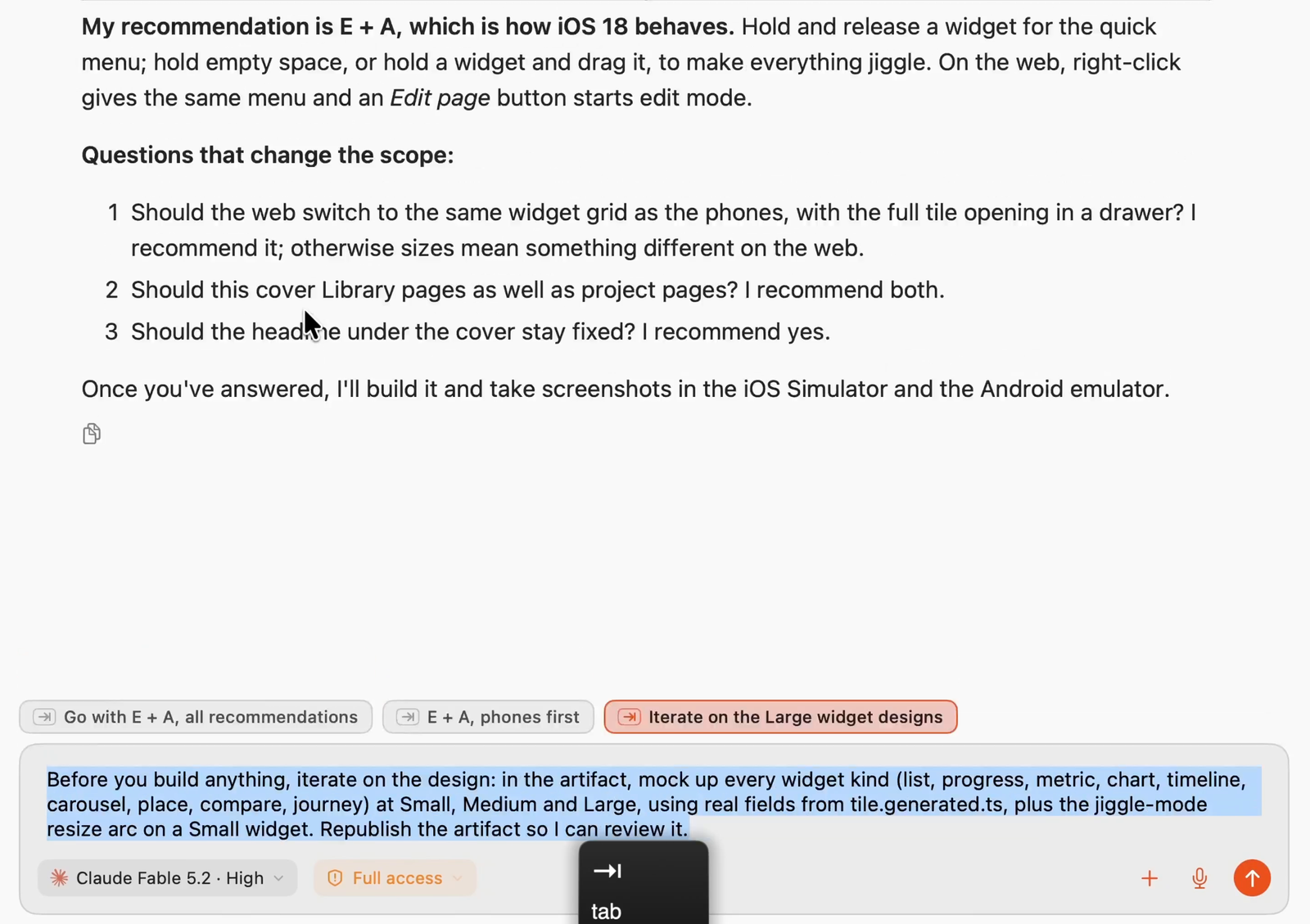
These three tiles appeared:
- Go with E + A, all recommendations. Takes every recommendation and turns it into a complete build: sizes on the page record in
tools/genui/page.tsplus the sync, the sharedpackWidgets, widgets at all three sizes on phones and web, Undo and the + tray. Then rununit_tests, mobileall_tests,e2e_projectsande2e_pages, and send iOS Simulator and Android screenshots. - E + A, phones first. The same design with less at stake: keep the web's ⋯ menu and leave the web layout alone, build the context menu, jiggle mode, resizing and drag-to-reorder in
ProjectWidgets.tsxandProjectScreen.tsx, and verify with//apps/chat/mobile:all_testsand simulator screenshots of each state. - Iterate on the Large widget designs. The one no button would ever offer: "Before you build anything, iterate on the design: in the artifact, mock up every widget kind (list, progress, metric, chart, timeline, carousel, place, compare, journey) at Small, Medium and Large, using real fields from
tile.generated.ts…" It noticed that the plan was still a plan, and suggested making it better before spending hours turning it into code.
Each one answers the agent's questions differently. Each names real files and real test targets. Each ends with proof. That's the bar, and the rest of this post is about how we reach it.
Where "tap, tap, tap" came from#
Cursor got popular because of one key.
You typed, a grey suggestion appeared, you pressed Tab. Then it jumped to the next place you were obviously going to edit, and you pressed Tab again. Tab, tab, tab. It started life as Copilot++, a better Copilot that could suggest whole diffs instead of the rest of a line, and it became the reason many people switched editors. When Cursor bought Supermaven in 2024, the goal it announced was a Tab model that was especially good at long sequences of changes: "tab, tab, tab." A year later Tab was serving more than 400 million requests a day.
It worked because it ran at the speed of the next keystroke. You were already in the file, already holding the context, and the model only had to guess the next few characters you were about to type.
That loop no longer describes how a lot of us work.
The agent era moved the gap#
Today the unit of work isn't a keystroke. It's a turn. You give an agent a task, it runs for twenty minutes or three hours, and you go do something else: another agent, a meeting, lunch, sleep. When you come back, there's no blinking cursor in a half-finished function waiting to be completed. There is a transcript you didn't watch, a branch you didn't write, and an empty prompt.
The question in front of you is no longer what's the next token? It's what's next?
That question is surprisingly expensive. To answer it you have to reload the whole situation: what you asked for, what the agent actually did, what it skipped, whether the tests ran, whether the work is committed, whether a pull request exists, whether CI on that pull request is red. Some of those answers are buried in the transcript: the option the agent set aside in paragraph four, the "I didn't run the integration tests" near the end. Others aren't in the transcript at all. They're in git and GitHub, and the agent finished before CI did.
So you scroll up, reread the plan, open a terminal, run git status, run gh pr checks, and then write the next prompt: answer the agent's three questions, remind it which files matter, tell it how to verify. Multiply that by every agent you run in parallel and coming back up to speed becomes the job.
Code autocomplete took the friction out of typing. Nobody had taken the friction out of deciding what to ask next. That's the gap we set out to fill.
Why canned buttons don't work#
Most agent tools today hand you an empty prompt when the turn ends. The ones that offer anything offer the same short list after every turn. That was our first version too: a row of fixed buttons under the response. Summarize. Review. Create PR.
They didn't work, for three reasons.
They're the same every time. A button that never changes becomes furniture. After a day you stop seeing it, the same way you stop seeing a banner ad.
They're wrong half the time. "Create PR" after the agent already opened one. "Review" after you asked how the LRU cache evicts entries, when there's nothing to review. "Summarize" after a two-line answer. A suggestion that's wrong even occasionally teaches you to ignore all of them.
They're vague. "Review" doesn't say review what, against what, or what happens next. You still have to write the real prompt yourself, so the button saved you nothing.
Cursor's team made the same point about Tab: a high accept rate isn't only about a smarter model; it's about knowing when to suggest and when not to. Their improved model made fewer suggestions and had them accepted more often. A suggestion box earns attention by being right, and by staying quiet when it has nothing to say.
So we threw the buttons out and asked a different question: if a senior engineer had read this whole conversation and looked at this repository right now, what would they tell the agent to do next?
What an expert would type next#
The answer is almost never "review". It's the thing this conversation in particular is missing.
Sometimes it's the plan. The widget conversation above ended in a proposal, and the most valuable next step was to pressure-test the proposal before building it.
Sometimes it's the agent's own admission. While we drafted this post, the agent helping us finished its first version by saying the terminal examples further down were drawn by hand, not captured from the real app. The suggestion that appeared was Capture a real TUI screenshot. Not "Review the post". The exact weakness it had just confessed.
Sometimes it's a loose end in one sentence. Here the task was tiny: add a one-line doc comment, keep the change minimal, don't commit. The agent did it and said so honestly: I didn't build it, and nothing is committed.
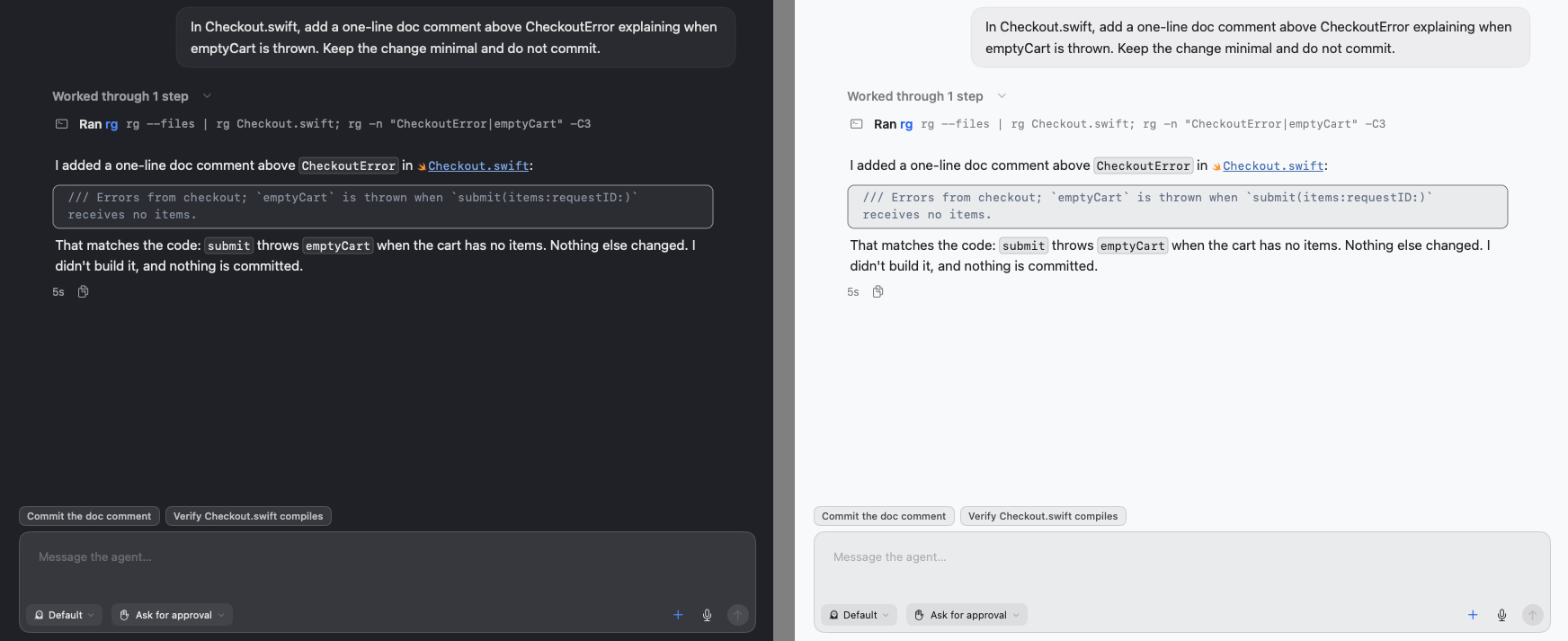
The two suggestions are exactly the two loose ends in that sentence: Commit the doc comment and Verify Checkout.swift compiles.
Put side by side, the difference is plain:
| What just happened | A canned button | Agentastic |
|---|---|---|
| The agent proposed five widget designs and asked three questions that change the scope | Review | Go with E + A, all recommendations · E + A, phones first · Iterate on the Large widget designs |
| The agent finished a draft and admitted its terminal examples were mock-ups | Summarize | Capture a real TUI screenshot |
| The agent added a doc comment but didn't build it or commit it | Create PR | Commit the doc comment · Verify Checkout.swift compiles |
| You asked how LRU eviction works, and it explained | Review | Nothing. There's nothing to do. |
Hover a tile and you see the full message it would send, written as you'd write it, with enough detail that the agent can act on it without asking you anything. That's the bar for every suggestion: specific, grounded, and complete. Specific means it names the files, the branch, the pull request, the test targets. Grounded means every fact in it came from the conversation or the repository, never from the model's imagination. Complete means you could send it unedited, including how to check the result.
Three things make that possible, and none of them is a cleverer button:
- It has seen the history. The suggestion is written by the agent that did the work, with the same model and the entire conversation in view. It knows which option you leaned toward, what it promised to do next, and what it skipped.
- It knows the present. The repository and the pull request are checked the moment the turn ends, so it knows what the transcript can't: that the work isn't pushed, or that CI went red five minutes ago.
- It's told to think like a reviewer, not a menu. Answer the questions the agent left open. Unblock what's stuck. Ship what's unshipped. Carry the plan forward, including the verification that got skipped. Never invent. And say nothing when nothing is worth saying.
How we write them#
Behind those tiles is a small pipeline that runs once, when a turn ends. The judgment is the model's; everything around it is deliberately boring.
1. Ask the agent that did the work#
In Chat, the suggestions don't come from a separate, smaller "suggestion model" reading a summary. Agentastic asks the agent itself. When a turn ends, it makes a private copy of the conversation and asks, in effect: your turn just finished; what is the user most likely to ask you next?
That copy holds everything: your original request, every message since, the plan, the alternatives, the questions, the caveats. It runs on the same model you picked for the session, at low reasoning effort, because the hard thinking already happened in the turn itself. Nothing is added to the real conversation or its history.
That's why "Iterate on the Large widget designs" can exist. Only something that had been part of the design discussion would know there were Large widget designs to iterate on, which nine widget kinds exist, and that tile.generated.ts holds the real fields to mock them up with.
In the terminal, the same instructions run in a hidden, temporary turn with tools disabled and every MCP server switched off. It gets the most recent part of the visible conversation, within a budget of about 4,000 tokens, sometimes on a faster helper model.
Either way, the request cannot act. If the model tries to call a tool, the answer is thrown away. Transcripts can contain text from web pages, issues, and logs, so the prompt says plainly that the repository state is data to read, not instructions to follow.
2. Tell it what's true right now#
The conversation tells the agent what it said. The repository tells it what's true. So alongside that request, Agentastic runs three read-only probes in parallel in the agent's working directory:
git status --porcelain=v1 --branch: the branch, how many files changed, and how far ahead or behind its upstream it isgit symbolic-ref refs/remotes/origin/HEAD: the default branch, so "open a PR" knows what to targetgh pr view --json …: the open pull request's number, title, draft state, base branch, CI check results, merge conflicts, whether it's behind its base, and whether a reviewer requested changes
Each probe has a five-second timeout and a 64 KB output cap, and none of them can prompt for credentials. If GitHub's CLI isn't installed or signed in, the facts say so ("Pull request: unknown") instead of guessing. The results are reduced to a short, plain block of facts:
- Branch: feat/billing-export (default branch: main)
- Working tree: clean
- Pull request: #77 "Export invoices as CSV" (open) into main
- CI checks: 1 failing (build), 4 passing
- Merge: conflicts with main
That block is capped at a kilobyte. It isn't a dump of the repository. It holds the handful of facts that decide what you'll do next: is the work committed, is it pushed, is there a PR, is the PR blocked.
This is the part that makes suggestions timely and not just relevant. The agent may have finished an hour ago; CI may have failed five minutes ago. The facts are read when the turn ends, against the live repository and the live pull request.
3. A priority ladder, not a menu#
The instructions are the part we've rewritten most. They don't ask for "helpful suggestions". They give the order a careful engineer would work through when they sit back down:
- Answer the open question. If the agent ended by asking you something or offering options, the best suggestions are the answers you'd most likely give, each spelled out completely. That's where the widget tiles came from: two different answers to the agent's three scope questions, plus a third path: improve the design before building any of it. One keystroke instead of a paragraph.
- Unblock the pull request. Merge conflicts, failing CI checks, requested changes. These are the things that silently stall work for days.
- Ship unshipped work. Changes nobody has reviewed. Work that isn't committed. Commits that aren't pushed to the open PR. CI that's still running and worth watching. A draft PR when the work is unfinished or unverified.
- Carry the conversation's own plan forward. The agreed next phase, the verification that was skipped or failed ("Verify Checkout.swift compiles"), the weakness the agent admitted ("Capture a real TUI screenshot"), the obvious next task.
The ladder is ordered, but the content isn't generic. Rung 2 isn't "fix CI"; it's "PR #482 fails lint and test-linux; inspect them with gh pr checks 482, fix the causes, rerun locally, and push." Every rung is filled in with this conversation's facts.
And a short list of rules that do most of the work:
- Never invent. Every pull request, check, file, and failure must appear in the repository state or the conversation.
- Don't repeat finished work. No "open a PR" when one exists. No "rerun the checks" when they passed.
- No pull request or CI work outside a git repository, or after a purely exploratory question.
- Fewer is better. Up to three, best first, and only the ones it's confident about.
- Zero is a valid answer. After a pure explanation ("How does the LRU eviction work?"), the right number of suggestions is none, and the tiles simply don't appear.
- Use the user's language.
The terminal agent's prompt also teaches by example: seven worked cases using the same fact layout the probes produce, from "PR has failing lint and test-linux" to "the assistant asked a yes/no question" to "nothing worth suggesting". The examples are deliberately plain; they teach the format and which facts matter. The judgment comes from the conversation.
4. Validate, and drop rather than repair#
The answer is JSON, and we trust none of it until it's checked. Labels must be at most 40 characters (the instructions ask for six words or fewer, imperative, no trailing period). Prompts must fit in 600 characters and are flattened to a single safe line. Duplicates are removed. Anything over three is cut. A suggestion to start a code review survives only if the probe actually found changes to review.
Anything malformed is dropped, not repaired. A suggestion we had to fix is a suggestion the model didn't understand, and we'd rather show two good tiles than three where one is wrong.
5. Belong to one moment#
Suggestions are presentation state and nothing more. They're tied to the turn they were written for: if you start a new turn while one is still being generated, the request is cancelled and its result discarded. They're never saved. Typing in the prompt hides them, clearing the prompt brings them back, and the next turn replaces them. A suggestion that outlives its moment is worse than none.
The interaction: tap, tap, tap#
All of that is invisible. What you see is a key.
In Chat, the suggestions sit as small tiles above the composer, each with a Tab keycap on it. With the prompt empty:
- Tab puts the first suggestion's full message in the prompt, selected, and highlights its tile.
- Tab again moves to the next one, wrapping around. The tiles stay put while you cycle, so you can see where you are.
- Return accepts the one you're looking at. The selection goes away, the cursor lands at the end, and the text is now yours to edit.
- Return again sends it.
So the whole interface is Tab, Tab, Return, Return, without touching the mouse.
Every one of those choices is deliberate. Tab is otherwise inert in an empty prompt, so it takes nothing away from you. Typing a single character ends the preview and leaves your text alone. Undo knows about previews. Clicking a tile while you're previewing another just swaps it; clicking a tile after you've written your own words changes nothing. Hovering any tile shows the full message before you commit to it, and VoiceOver reads the same.
Why two Returns#
Cursor's Tab accepts with a single keypress, and that's right for code completion: the edit is small, local, and one undo away.
A prompt is different. Accepting it can start hours of work, rewrite files, or push to a shared branch. So in Agentastic nothing is ever sent on your behalf. The first Return turns a preview into your draft; only the second one sends it. We learned this the honest way. The first terminal version ran a suggestion as soon as you picked it, and within days we changed it to drop the message into the composer for you to read first. One extra keypress is cheap. An agent confidently doing the wrong thing for an hour isn't.
In the terminal too#
Agentastic's coding agent also runs as a terminal UI, and the suggestions are there too, built from the same instructions and the same repository facts. Here's how the widget conversation from the top of this post would end there. When the turn finishes, a single quiet line appears above the empty composer:
  ↳ Next: Go with E + A, all recommendations · E + …   tab to choose
╭──────────────────────────────────────────────────────────────────╮
│ ❯                                                                │
╰──────────────────────────────────────────────────────────────────╯
In a narrow terminal the labels end in an ellipsis, but the Tab hint always stays visible. Press Tab and a picker opens with the full message beside the highlighted choice:
  Suggested next steps

  1. Go with E + A, all recommendations
› 2. E + A, phones first         Go with E + A, but phones only for now:
                                 keep the web's ⋯ menu and leave the web
                                 layout alone. Cover project pages and…
  3. Iterate on the Large widget designs

  enter select · esc back
Enter puts a prompt in your composer to edit and send. A review suggestion starts Agentastic's built-in review agent directly, since it only reads. The row hides while you type and disappears while the agent is working, so it never competes with you for the prompt.
Which agents get them#
The engine was built in our own agent, and then we brought as much of it as we could to the agents people already use in Chat:
| Agent | Where | What you get |
|---|---|---|
| Agentastic | Chat on your Mac or in a worktree container, and the terminal TUI | Up to three suggestions, written from the conversation and the live repository and pull request |
| Claude Code 2.1.154+ | Chat | One predicted prompt per turn, written by Claude Code using the conversation's prompt cache |
| Qwen Code | Chat | One predicted prompt per turn |
| ACP agents | Chat | Up to three, for agents that implement our _agentastic.dev/follow_ups extension |
| Codex | Chat | Not yet |
Remote and cloud Agentastic chats don't offer suggestions yet. The same tiles appear in the iPhone companion app, so you can pick the next step from your phone while the Mac does the work. If you'd rather not spend the extra request, turn suggestions off under Composer settings.
How we got here#
- October 2: suggested next steps ship in Agentastic's terminal agent and over ACP, with the shared engine: repository probe, prompt with worked examples, a hidden tool-less turn, validation.
- October 6: picking a suggestion stops sending it immediately. It now lands in the composer for review first.
- November 1: suggestions come to Chat on the Mac as tiles above the composer, written by the agent itself on a private copy of the finished conversation.
- November 2: Claude Code and Qwen Code chats get their own predicted next prompt.
- November 14–15: Tab cycles through suggestions in the empty prompt, Return accepts, Return sends; tiles show a Tab keycap and stay highlighted while you cycle. This shipped in Agentastic.dev 0.18.
Six weeks, and most of that time went into things you'll never notice: a label limit, a timeout, a rule about what not to suggest, an undo edge case. That's the point. A suggestion feature is only as good as its worst suggestion, because that's the one that teaches you to stop looking.
The next keystroke was never the hard part#
Autocomplete was the right interface for typing. When agents do the typing, your job becomes deciding: whether the plan is good enough to build, which of the agent's questions to answer and how, what to verify before you trust it, what to ship. You make dozens of those decisions a day, across many agents, every time you come back to one cold.
A generic button can't help with any of that, because it doesn't know what happened. Agentastic's suggestions do. They come from the agent that was there for the whole conversation, they're checked against your repository as it is right now, and they're written the way an experienced engineer would write the next instruction: specific, grounded, and finished with how to prove it worked.
So you come back, glance at three tiles that already know the plan, the open questions, and that your build is red, and press Tab, Tab, Return, Return.
Suggested next steps ship in Agentastic.dev, free for macOS. Run any agent in Chat or open Agentastic in the terminal, let it finish something, and press Tab.
Frequently asked questions#
What are suggested next steps in Agentastic?#
When an agent finishes a turn, Agentastic offers up to three likely next prompts above the composer, written for that conversation: answers to the questions the agent just asked, a way to improve its plan before building, the verification it skipped, or the fix for the CI check that just failed on your pull request. Press Tab in the empty prompt to preview them in turn, Return to accept one for editing, and Return again to send it. Nothing is sent until you send it.
How are the suggestions generated?#
In Chat, Agentastic asks the agent that did the work, on a private copy of the whole conversation, using the same model at low reasoning effort. Alongside, it reads the repository state the moment the turn ends (branch, uncommitted changes, upstream, and the open pull request's CI checks, merge state and review decision). That request can't call tools. Its answer is validated: at most three suggestions, each grounded in the repository or the conversation, with short labels and complete prompts. Anything malformed is dropped rather than repaired.
Which agents support suggested next steps?#
Agentastic's own agent offers up to three, both in Chat and in the terminal TUI. Claude Code 2.1.154 or later and Qwen Code each offer one predicted prompt in Chat. ACP agents that implement Agentastic's _agentastic.dev/follow_ups extension can offer them too. Codex chats don't offer suggestions yet, and neither do remote and cloud Agentastic chats.
Do suggestions cost extra tokens?#
Yes, a little: one extra request per finished turn, at low reasoning effort. In Chat it rereads the conversation along with a short added prompt of about 4,000 bytes at most. You can turn suggestions off under Composer settings.
Does Agentastic ever send a suggestion on my behalf?#
No. Picking a suggestion puts its message in your prompt so you can read and edit it. Sending stays your decision. The one exception is in the TUI: picking a review suggestion starts Agentastic's read-only review agent directly.