How to Run Multiple Codex Agents in Parallel
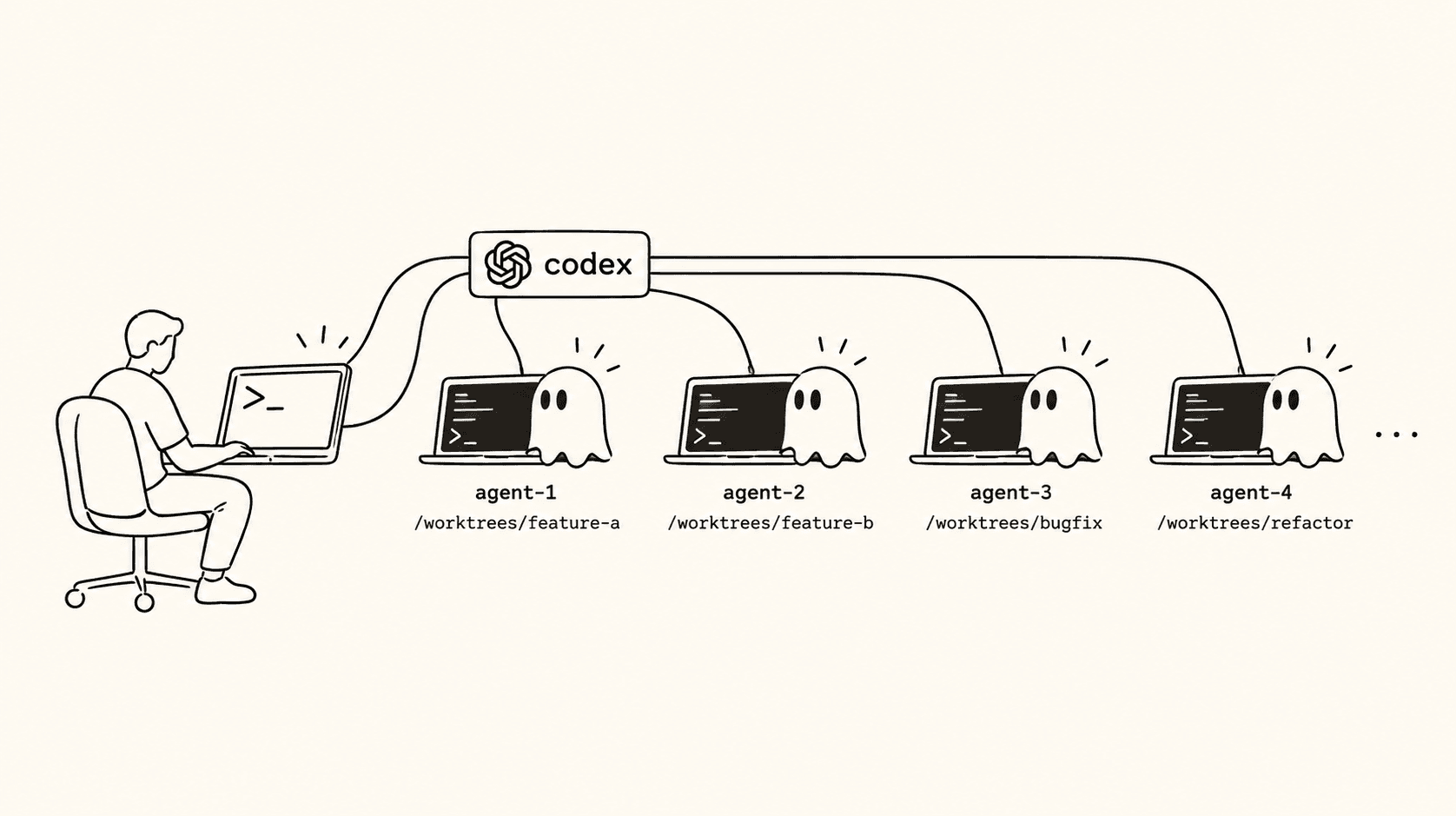
To run multiple Codex agents safely, isolate every independent task in its own Git worktree. OpenAI's own Codex interface, which now lives in the ChatGPT desktop app, manages worktrees for Codex-only workflows. Agentastic runs the same Codex CLI alongside Claude Code, Gemini, Cursor, and other agents, while adding containers, remote hosts, browser testing, and multi-provider review.
Choose the workflow that matches the job#
| Workflow | Best when | What you manage |
|---|---|---|
| Codex worktrees in the ChatGPT desktop app | You want a first-party Codex-only experience | Codex project setup and review flow |
| Manual worktrees plus Codex CLI | You want no additional workspace application | Worktrees, terminals, setup, status, ports, review, cleanup |
| Agentastic | You want multiple providers, native terminals, containers, browser verification, or remote/cloud execution | Task boundaries and final review |
OpenAI's official worktree documentation explains how Codex runs independent chats in separate checkouts, handles local/worktree handoff, copies ignored files, and cleans up managed worktrees.
Why one checkout cannot host parallel Codex edits#
Codex sessions are independent, but files are not. If two sessions edit the same checkout, they share uncommitted changes, generated files, dependency directories, and the Git index. A session can test code that already contains another session's half-finished edits.
A worktree gives each task a physical checkout. Every result becomes an independent diff you can keep, revise, or discard.
Option 1: use Codex's first-party worktrees#
There is no standalone Codex app anymore: on July 9, 2026, OpenAI merged it into the ChatGPT desktop app (what's new), which runs on macOS and Windows, with a Linux preview. Choose Codex there and pick Worktree below the composer, and the chat gets a managed worktree in detached HEAD under $CODEX_HOME/worktrees. OpenAI documents three useful properties:
- Each chat stays associated with its worktree.
- Work can be handed between the background worktree and the local checkout.
- Ignored local files can be copied with
.worktreeinclude.
This is a strong default when every worker is Codex and you want the first-party surface. Codex app vs CLI explains what changed in the merge and when the CLI is the better tool.
Option 2: run the Codex CLI in manual worktrees#
The Codex CLI added experimental managed worktrees (--worktree or /worktree) in v0.154.0. Until that settles, plain Git worktrees give you the same isolation with nothing experimental involved. Create one branch and directory per task:
git fetch origin

git worktree add -b agent/auth-tests \
  ../app-auth-tests origin/main

git worktree add -b agent/cache-fix \
  ../app-cache-fix origin/main
Start Codex from each checkout:
cd ../app-auth-tests && codex
cd ../app-cache-fix && codex
Manual worktrees are universal and transparent. At three or four sessions, however, terminal naming, waiting approvals, setup scripts, dev servers, and review queues become the real work.
Option 3: run parallel Codex workspaces in Agentastic#
1. Install and verify Codex#
npm install -g @openai/codex
which codex
codex --version
Sign in through Codex before launching it from Agentastic. Agentastic uses the provider's existing authentication, configuration, skills, and MCP servers. If you split work between a personal and a work OpenAI login, give each its own CODEX_HOME, as described in using multiple Claude Code and Codex accounts on one Mac.
2. Open your repository and choose Worktree mode#
In Agent Home:
- Select the repository.
- Choose the base branch.
- Select Codex.
- Keep Worktree selected.
- Name the task.
- Send a prompt with an explicit validation command.
Example:
Fix the flaky token refresh test in the authentication module.

Do not change the public session API. Preserve the existing retry limit.
Run only the authentication test target first, then the full unit suite if it passes.
Summarize the race condition and every file changed.
Repeat for independent tasks. Each Codex session receives its own branch, checkout, terminal or Chat transcript, and diff.
3. Use one source of repository instructions#
Codex reads AGENTS.md, so keep durable project rules there:
# Repository instructions

- Run `npm test -- auth` for authentication changes.
- Do not edit generated clients under `src/generated`.
- Keep public API changes backward compatible.
- Never run production migrations from a development task.
Task-specific constraints belong in the prompt. Repository-wide rules belong in version control, where every parallel session sees the same contract.
4. Make the checkout runnable before Codex starts#
Use .agentastic/setup.sh for dependencies and ignored configuration:
#!/usr/bin/env bash
set -euo pipefail

for file in .env .env.local; do
  if [ -f "$AGENTASTIC_MAIN_REPO_PATH/$file" ] && [ ! -f "$file" ]; then
    cp "$AGENTASTIC_MAIN_REPO_PATH/$file" "$file"
  fi
done

npm ci
Do not make the agent spend its first turn discovering how to boot the project. A reproducible setup script improves every provider, not only Codex.
5. Choose task boundaries before adding concurrency#
Parallelize tasks that can produce independent pull requests:
- Fix unrelated failing tests.
- Add coverage in separate packages.
- Implement independent endpoints.
- Compare two alternative implementations where only one survives.
- Let Codex implement while a fresh Claude or CodeRabbit session reviews.
Sequence tasks that share a schema, central interface, generated artifact, or mutable database.
6. Use attention routing instead of polling terminals#
Agentastic shows whether each session is running, waiting, finished, or failed. In Agentastic's Chat view, you can also steer a Codex turn while it runs by holding Option as you send. This lets you supervise by exception instead of opening every terminal every few minutes.
7. Test the result where it was produced#
Each worktree should be able to build and run independently. Start its development server and verify the result in Agentastic's browser. Agents can use the dev browser CLI to inspect the page, fill forms, read console errors, and capture screenshots.
For non-UI changes:
- Re-run the focused tests.
- Inspect the diff rather than trusting the transcript.
- Check migrations and generated files separately.
- Confirm no secrets or local paths entered the patch.
8. Review with a fresh context#
The agent that wrote a change carries the assumptions that produced it. A separate review session starts with a cleaner perspective.
Agentastic can send the captured diff and commit context to Codex review, Claude Code, CodeRabbit, Greptile, or a custom reviewer. Use multiple reviewers for security-sensitive or architectural changes, then validate their findings yourself.
Worktree, container, remote, or cloud?#
Agentastic can launch Codex in several execution modes:
- Worktree: fastest local isolation for normal code changes.
- Container: tighter runtime, dependency, mount, and network boundaries.
- Remote SSH: use your own development machine or server.
- Cloud provider: run on connected Modal, Fly.io, or Vercel environments while the Mac is offline.
Use a worktree until you have a concrete reason to isolate more than repository files.
Avoid the most common parallel-Codex mistakes#
Sending one vague feature to five agents#
Concurrency does not repair an unclear specification. Split the feature into independent, reviewable outcomes first.
Letting every worktree use the same database#
File isolation cannot prevent two migrations or test suites from mutating one shared service. Give each task its own database, schema, container, or serialized test lane.
Starting more work than you can review#
The queue that matters is not "agents running." It is "diffs waiting for a careful human." Cap concurrency when that queue grows.
Merging related branches without updating the rest#
After one branch changes a shared assumption, update or rebase dependent worktrees before accepting their results.
Start with two tasks#
Pick two independent issues, launch one Codex workspace for each, and take both through setup, execution, verification, review, and cleanup. Once that loop is boring, increase concurrency.
Download Agentastic for macOS or see the dedicated Codex integration page. Comparing interfaces first? Our roundup of the best Codex GUI and desktop apps covers the alternatives.
Sources and further reading#
- Worktrees — official OpenAI documentation
- Codex CLI — official OpenAI documentation
- Git worktree documentation
- Your First Agent — Agentastic Docs
- Browser automation — Agentastic Docs
Frequently asked questions#
Can Codex run multiple agents in parallel?#
Yes. In the ChatGPT desktop app, each Codex chat can run in its own managed worktree. With the Codex CLI, create one git worktree per task and start codex in each. Agentastic runs the same CLI with a worktree, container, SSH host, or cloud VM per task.
Where is the Codex app now?#
Inside the ChatGPT desktop app. OpenAI merged the standalone Codex app into it on July 9, 2026; choose Codex in the app to get its chats, worktrees, and Git tools on macOS, Windows, or the Linux preview.
How do Codex worktrees work?#
Choose Worktree for a chat and Codex creates a checkout in detached HEAD under $CODEX_HOME/worktrees, copies the ignored files listed in .worktreeinclude, and keeps the chat attached to it. Handoff moves the chat and its changes between the worktree and your local checkout.
Does Codex read AGENTS.md?#
Yes. Keep durable repository rules in AGENTS.md, such as test commands and generated files not to edit, so every parallel session sees the same contract, and put task-specific constraints in each prompt.
Can I run Codex in a container or on a remote machine?#
Yes, with Agentastic: Codex can run in a Docker or Apple container, on your own SSH host, or on a cloud VM in your Modal, Fly.io, or Vercel account. Start with a worktree until a task needs more than file isolation.
How do I get a second opinion on Codex's changes?#
Run a separate reviewer against the diff. Agentastic's code review can send the captured diff to codex review, Claude Code, CodeRabbit, Greptile, or a custom command, and several reviewers can run in parallel.