The Art of Building a Text Editor for Humans
The editors we type in are browsers. Ours isn't.
There are very few native text editors on the Mac. Some of them are wonderful. BBEdit has been shipping since 1992 and is still updated with a straight face. TextMate taught a generation what a bundle was. Panic's Nova may be the most beautiful editor ever made for this platform. Xcode is native to the bone, as long as what you're writing runs on Apple hardware.
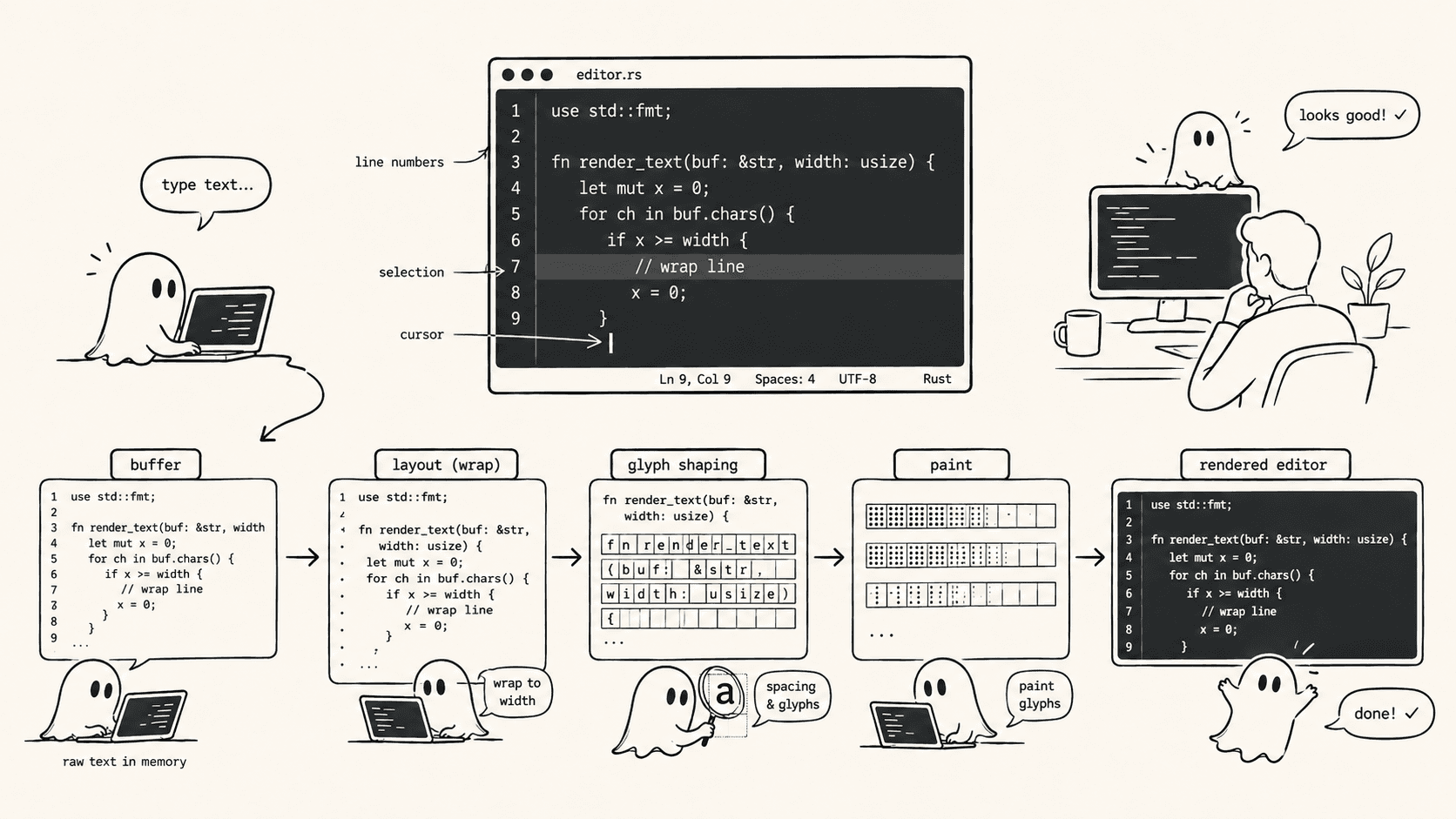
When you want to build your own IDE, and you are faced with which code editor to bundle with it, there are surprisingly not that many options. The editor most developers actually type into today, the one with the chat pane and the agent working away in a sidebar, and you are looking at a web page. VS Code, Cursor, Devin Desktop (the editor formerly called Windsurf), and their forks are Chromium with a title bar. Zed draws its own windows on the GPU and runs on Linux and Windows too; it is native the way a game is native, owning its pixels and none of the platform's furniture.
The native Mac code editor for the agent era doesn't exist. We noticed because we needed one.
The last room in the house#
An IDE used to be a text editor with things attached. Somewhere in the last two years it turned inside out. Agentastic, the IDE we build, is mostly a control room: terminal panes where agents run, chat panes where you talk to them, a board of tasks, diff views that summarize what changed while you were in a meeting, a browser so the agents can see what they built. The agents never open the text editor. They read files through tool calls and write them through patches. They don't scroll. They don't blink a cursor. They don't notice when the syntax highlighting flickers.
The text editor is the last room in the house that is only for people.
One might argue that an agentic IDE, which is what Agentastic is, has no room for an editor at all. Who reads the code anymore? That is not what we believe at Agentastic. Agentastic.dev is designed for humans, with the agents co-mingling in the corners, and first-class editor support is an important part of that mission.
The Editor is a critical part of the human-agent interface. It's where you read what an agent wrote, decide whether you believe it, and type the one line that fixes it. A lot of the time, it is much easier to just edit the one line of the code, instead of going back-n-forth with the agent. Because the main user is human, whereas in many other place, the main user is the agent, editor benchmark is different. Everything else in the IDE is measured in throughput. The editor is measured in feel: whether the character appears on the very next frame, whether the scroll stays smooth through a forty-thousand-line log, whether the cursor stays put when you undo, whether the colors hold still when you click into the pane. A person feels every one of those. No agent ever will.
That is why the browser-in-a-window bothered us. A web engine can be fast. But it is a second world living inside your window, with its own event loop, its own layout engine, its own idea of what has focus. Every keystroke crosses that border twice. The editor we wanted had to live on the same run loop as the terminal beside it, drawn by the same compositor, focused by the same responder chain. It had to be an NSView.
Someone had already tried#
We didn't want to start from a blank file. Text editors are a famous graveyard. The interesting problems only show up after the first ten thousand lines, and nobody should have to rediscover them alone.
Apple's own tools weren't the answer. TextKit is superb at rich text and a poor fit for a two-million-character source file with the cursor at the bottom. Its model wants to know about the whole document, and its contract with NSTextView makes it hard to bound the work done per frame. A code editor wants the opposite: monospaced text, one attributed run per token, and a viewport that is a tiny window onto something enormous.
Then we found CodeEdit, an open-source project whose whole premise is an editor written for macOS and nothing else. Its text engine lives in two MIT-licensed packages. CodeEditTextView is a text view built from scratch by Khan Winter, with its own layout manager and no TextKit underneath. CodeEditSourceEditor adds the gutter, the minimap, syntax highlighting, folding, and find. It's a genuinely good design, the kind you only get from someone who has been burned by the alternatives. Agentastic ran on those packages as ordinary dependencies for a long time.
We copied both packages into our repository and started treating them as ours. The things we needed to change were internal: how many lines a layout pass may touch, how a background parser reads text, what happens when a scroll view notifies a view that notifies the scroll view. Those aren't extension points in anyone's package. Since then we've made about sixty commits to the two packages and added a third one of our own. This is the story of what we learned.
keystroke#
The best way to understand an editor is to follow one character from the keyboard to the screen. Press e.
macOS delivers the key event to the window, which hands it to the first responder: our TextView. The view is an NSTextInputClient, so the system's input context gets the first look, which is how input methods, dictation, and the emoji picker all arrive through the same door. For a plain e, the context calls insertText and steps aside.
Before the letter touches the document, it passes through a chain of filters. Is it a newline? Then indent the new line to match the old one. An opening bracket? Insert the closing one, and remember to skip over it later. A tab? Replace it with spaces if that's the setting. A backspace inside leading whitespace? Delete back to the previous indent column. An e is nothing special, so the filters wave it through, and it becomes a TextMutation: replace this zero-length range with the string "e".
Every edit in the editor, whether from a key, a paste, an undo, or the file changing on disk, goes through one method with that mutation:
public func applyTextMutation(_ mutation: TextMutation) {
    guard canReplaceCharactersInEditorBuffer(range: mutation.range) else { return }
    _undoManager?.registerMutation(mutation)

    editorBufferSnapshotBeforeCurrentEdit = editorBuffer.snapshot()
    defer { editorBufferSnapshotBeforeCurrentEdit = nil }

    editorBuffer.replaceCharacters(in: mutation.range, with: mutation.string)
    textStorage.replaceCharacters(in: mutation.range, with: mutation.string)
    selectionManager.didReplaceCharacters(in: mutation.range, replacementLength: length)
    layoutManager.invalidateLayoutForRange(mutation.range)
}
Read it top to bottom and you've read the editor's constitution. First the undo manager records the inverse, grouped with the letters you typed before it, because one undo should take back one word and not one character. Then two copies of the text are updated: the NSTextStorage that AppKit knows about, and a versioned buffer of our own that we'll come back to. Then every cursor after the edit shifts by one. And only then is layout invalidated, for the range of the edit and nothing else.
The layout manager doesn't lay out the document. It lays out the viewport. The document is split into lines exactly once, when the file opens, and the lines go into a red-black tree. Each node caches the total length and total height of everything beneath it, so the two questions an editor asks a thousand times a second both cost a logarithm:
lineStorage.getLine(atOffset: 1_204_331)   // which line holds this character?
lineStorage.getLine(atPosition: 48_112.0)  // which line is drawn at this y?
Your e marked one line as dirty. On the next turn of the run loop AppKit calls layout(), and the manager walks only the lines whose vertical range falls inside the visible rectangle plus 350 points of padding on either side. It finds your dirty line and hands its text to CoreText, which breaks it into fragments and returns a CTLine for each. Every fragment on screen is drawn by a tiny NSView of its own, recycled from a pool the way a table view recycles its cells, so scrolling through a file allocates almost nothing. If the line's height changed, the lines below it are moved down; they are not re-typeset. The cursor view is placed at the end of the new fragment. Then the fragment views draw their lines and the frame is done.
Meanwhile, in the background, the highlighter has noticed. The edited range has been marked invalid in a little state machine that exists for each highlight provider. Tree-sitter, the primary provider, applies your one-character edit to the syntax tree it already has, re-parses only what changed, and answers a query for the captures in the visible range. Its answer comes back stamped with the document version it was computed against, gets merged into a rope of styled runs, and is written to the text storage in one batch. The letter takes its color a few milliseconds after it appears, too fast to see.
That's one keystroke. Everything that follows is what happens when one of those steps forgets to be bounded.
Seventeen seconds#
macOS 26 shipped, and the editor froze for seventeen seconds at launch.
It wasn't a crash and it wasn't a deadlock. It was layout. The minimap, a second copy of the whole layout engine drawing every line of the document three points tall, had a visible rectangle that spanned thousands of lines. That had always been true. What changed was AppKit. In the new update cycle, a view that sets needsLayout on itself during layout gets laid out again in the same cycle, immediately, without returning to the event loop. Our layout manager did exactly that whenever a pass had more work than it could finish, as a way of saying "continue next frame." The new AppKit heard "continue right now," and several thousand full line layouts became one uninterruptible stall.
The fix is two ideas. The first is a budget. A layout pass may fully lay out at most a fixed number of lines, five hundred in the editor and a hundred and twenty in the minimap. Any line past the budget keeps whatever fragment views it already has and is left out of the "visible" set, so the next pass picks it up as new. The second idea is one line long, and it's the line I would put on the wall:
if fullLayoutCount >= fullLayoutLimit {
    DispatchQueue.main.async { [weak self] in
        self?.layoutView?.needsLayout = true
    }
}
Hop the run loop. Don't ask for more layout; ask for more layout after the next event. That async is the difference between one seventeen-second frame and a hundred sixteen-millisecond ones. The screen fills top to bottom, the app answers the mouse, and you can start scrolling before the minimap is finished painting.
The same bug was hiding in smaller places. Adding a text attachment, the editor's mechanism for inline content that isn't text, invalidated the entire layout, so a file with a dozen attachments got a dozen full passes at open. Now it invalidates the attachment's range. And the minimap learned to know its limits. Above five thousand lines or half a million characters it turns itself off rather than draw a slow approximation. It lays out only its own clipped rectangle instead of the scroll view's document rectangle. And a single fragment is capped at twenty thousand characters and four thousand drawing runs, so one minified line can't take out a frame.
The parser that kept knocking#
The tree-sitter parser runs on a background thread, and while it parses it has to read the document. The upstream code handled this in the obvious way. When the parser wanted a chunk of text, it dispatched a read to the main thread and blocked until the answer came back.
// Before: every chunk the parser wanted was a round trip through the main thread.
return DispatchQueue.waitMainIfNot { textStorage.substring(...) }
Every chunk. Thousands of round trips per parse, each one a knock on the main thread's door. And the main thread, while you're typing, is busy doing layout. So the parser waited for layout, the highlight waited for the parser, and the colors on screen fell behind your fingers.
The way out was to give the parser its own copy of the truth. We wrote a third package, CodeEditBuffer, containing a piece table: the classic editor data structure that keeps the original file plus an append-only log of insertions, and represents the current document as a list of pieces pointing into one or the other. What makes it worth the trouble is that a piece table can take a snapshot in constant time. Copy the piece list and the version number, and you have an immutable view of the document that any thread may read forever, no matter what the main thread does next.
// After: the parser reads an immutable snapshot. No locks, no knocking.
let snapshot = textView.editorBuffer.snapshot()
parser.parse(tree: oldTree, readBlock: snapshot.createTreeSitterReadBlock(charsToReadInBlock: 4096))
The text view keeps the piece table in lockstep with NSTextStorage, which is why applyTextMutation updates both, and debug builds assert after every edit that the two still agree. The snapshot taken before each edit has a second job. Tree-sitter's incremental parsing needs to know where an edit started in the old document, in line-and-column terms, and computing that against the new document is subtly wrong whenever the edit crosses a line ending. Reading it from the pre-edit snapshot makes it exactly right.
There is a detail here I like too much to leave out. The file that implements the piece table has a header comment saying it was created by OpenAI. A coding agent wrote the first draft. The agents helped build the one room in the house that's still just for us.
A scheduler that slept#
The parser object isn't thread-safe, so the tree-sitter client serializes access to it. The original executor did this in the way that looks reasonable and isn't. A task would check whether the parser was free, and if not, sleep for ten milliseconds and check again.
On a fast machine with one task in flight you'd never notice. Under load it's a disaster. A highlight query that should take a few hundred microseconds waits out a full ten milliseconds. Three queued tasks wait thirty. The editor feels fine, and then one day it feels like it's underwater.
We rewrote the executor as a queue with reader-writer semantics, built on Swift continuations. Highlight queries are readers. Edits and language changes are writers. Each request takes a place in line and calls awaitTurn, which parks the task on a CheckedContinuation if it can't run yet. Whenever anything finishes, the executor walks the line and wakes everyone who is now eligible: every reader up to the next writer, or a single writer if it's at the head. Nobody polls. Nobody sleeps. And a reader that arrives when the line is empty runs synchronously on the calling thread with no suspension at all, which turns out to be the common case while you type.
While we were in there we found a quieter bug. A highlight query that started against one version of the document and finished after an edit would mark its range as valid, with colors for text that no longer existed. Nothing fixed it except editing that range again. Every query is now stamped with the revision it ran against, and a result from an older revision is thrown away so the next query picks the range up.
An editor arguing with itself#
AppKit's scroll view and its clip view talk to each other through notifications. A text view that resizes itself in response to layout, which ours must, can end up in a conversation with itself. Layout changes the content height, the frame grows, the clip view notices and posts a notification, the text view hears it and runs layout, which changes the content height. The signature is a stack trace that is nothing but _layoutSubtreeWithOldSize: all the way down, or a scroll position that jitters between two values until you close the window.
We found four of these loops and closed every one with the same small tool: a flag that means "I am the one changing this; ignore the echo."
When the layout manager reports a new content height and the text view updates its own frame, it raises isUpdatingFrame, and layout() returns early while the flag is up. When the editor scrolls on its own behalf, clamping the position after a big deletion, compensating for a line above the viewport that changed height, or restoring where you were when a tab reappears, it does so through one method:
public func performInternalScrollAdjustment(on scrollView: NSScrollView, _ update: () -> Void) {
    guard !isApplyingInternalScrollAdjustment else { return }
    let clipView = scrollView.contentView
    let savedBounds = clipView.postsBoundsChangedNotifications
    let savedFrame = clipView.postsFrameChangedNotifications
    isApplyingInternalScrollAdjustment = true
    clipView.postsBoundsChangedNotifications = false
    clipView.postsFrameChangedNotifications = false
    defer { /* restore all three */ }
    update()
    scrollView.reflectScrolledClipView(clipView)
}
Every scroll notification handler in the editor begins with a guard on that flag. Your scrolls flow through. Ours don't echo.
Two more loops lived in scroll-to-visible, the routine that brings the cursor on screen after an edit. It used to loop until the cursor's rectangle stopped moving, and with wrapped lines whose heights change as they're typeset, it sometimes never did. It now tries at most ten times and asks the layout manager for a fresh rectangle each time. And undo, which restores text, which triggers layout, which called scroll-to-visible, which triggered layout, now defers its scroll to the next turn of the run loop, after everything has settled.
Related, and worth its own paragraph, is the habit we picked up of doing things once per turn. Scrolling fires bounds notifications dozens of times a second. A paste changes the text, the selection, and the content height in a single call stack. The pattern we settled on isn't a timer or a debounce. It's a pending flag and one hop:
@objc func visibleTextChanged() {
    guard !pendingVisibleUpdate else { return }
    pendingVisibleUpdate = true
    DispatchQueue.main.async { [weak self] in
        self?.pendingVisibleUpdate = false
        self?.recomputeVisibleSet()
    }
}
The first event in a burst schedules the work. The rest are dropped. The work runs once, after the burst, on the same turn as the next frame, and there is nothing to tune. The visible-range tracker works this way, the minimap's content height works this way, and so does the fold calculator, which also runs off the main thread and yields every 512 lines so that folding a hundred-thousand-line JSON file freezes nothing at all.
The flash#
A flash is when the editor shows you the wrong thing for one frame: plain text before the colors come back, or a color that snaps from one value to another. It costs nothing you can measure, and it costs trust, which no profiler gives back.
Every flash we tracked down had the same shape. Something decided to reset state that hadn't changed.
Clicking into a pane re-applied the editor configuration with a nil "previous" configuration, which the controller read as "everything changed," and it cleared every attribute in the document before re-highlighting. Changing the theme did the same thing on purpose. Two NSColor values from different sources compared unequal because they were compared by reference, so a redraw fired for a color that was already on screen. And the SwiftUI wrapper around the editor rebuilt its array of highlight providers on every render, which the controller read as new providers arriving, which reset the highlighter.
None of those needed a new algorithm. They needed the discipline to compare values rather than identities, to invalidate rather than clear, and to keep an array's identity stable across SwiftUI updates. Colors are now compared by their sRGB components with a tolerance. Theme changes invalidate the highlighter and let the pipeline re-apply only what the theme touched. The provider array is built once. The colors hold still.
The emoji and the last line#
NSTextInputClient is the protocol through which macOS talks to a text view about anything richer than a key press: input methods, dictation, handwriting, VoiceOver, the emoji picker. Each of them is a different person typing a different way, and each of them found a bug.
Input methods show preview text before committing it. Un-marking that preview used to delete it, and committing it inserted it twice, so a Japanese or pinyin typist could watch a line corrupt itself. Dictation and handwriting send ranges that fall outside the current text, because the recognizer's view of the document lags behind yours; those ranges are now clamped before being expanded to character boundaries. The accessibility API asked for ranges built from NSNotFound plus a length, which overflows, so validation now happens before arithmetic. The backspace filter that deletes a run of whitespace scanned the line one UTF-16 code unit at a time and split surrogate pairs, so pressing delete after an emoji crashed the app; it walks composed characters now. And select-all didn't highlight the last line of the file.
None of that is performance work. All of it is for-humans work, and it's the part an agent would never have reported, because an agent has never tried to type a Japanese comment or dictate a commit message.
Writing the promises down#
Feel is not a regression suite, so we wrote the promises down as budgets. A benchmark gate in the text view package builds real documents in a real window and drives the real layout manager. A ten-thousand-line file must open in under 1.8 seconds and scroll end to end in under two. Pasting four thousand lines into a thousand-line file must re-layout in under 400 milliseconds. Toggling line wrap on fifteen hundred long lines must finish in under 200. Each runs three times after a warmup and fails if its median exceeds the budget. A second suite at the app level times file decode and save at a megabyte, workspace load at five hundred and ten thousand files, and worktree creation, in report-only mode while we settle the numbers.
The honest footnote is that these run on a self-hosted Mac when we ask for them, and weekly for the app-level suite, not on every pull request. Wall-clock budgets on shared hardware fail for the hardware more often than for the code. The bug-shaped regressions in this story are guarded differently, by about 2,300 lines of unit tests across nineteen files, one for each stack trace we never want to see again, and those do run on every pull request.
The art of it#
Looking back over a year of commits, almost everything we did is an instance of six sentences.
Never do unbounded work where AppKit can see you. A layout or scroll callback will be called again before you're done. Bound the loop, defer the rest, and hop the run loop to continue.
Never read mutable text from another thread. Snapshot it. A piece table makes snapshots free, so there is no excuse.
Coalesce to the run loop, not to a timer. One pending flag and one async beats every debounce you will ever tune.
When you change a view, say so, so the echo can be ignored. Every notification handler should know whether the user or the editor caused it.
Compare values, not identities, before you redraw. Anything equal must be treated as equal, or something will flash.
Test the inputs people actually produce. Emoji, dictation, a hundred-thousand-line log, a file with no trailing newline, and select-all on every one of them.
None of these are new. All of them are easy to violate in a codebase you didn't write, which is the real reason we vendored the packages and read every line of the layout path. You cannot make a text editor feel right from the outside.
Ours#
Somewhere right now an agent is finishing a change in a worktree. In a minute a person is going to open the file and read it, faster than anyone has ever read code before, looking for the one line that's wrong. The cursor will be blinking in an NSView, on the same run loop as the terminal the agent ran in, drawn by the same compositor as the rest of the window. When they find the line and start to type, the letter will be there on the next frame.
Agents took the terminal. The editor is still ours. We'd like to keep it that way.
The editor ships in Agentastic, free for macOS. If you want the surrounding machinery instead — the editor and tabs, language servers, and the fifty-plus coding agents that run beside it — the docs start at how Agentastic works.
Frequently asked questions#
Is Agentastic's code editor native or Electron?#
Native. The editor is an AppKit NSView on the same run loop as the terminal beside it, not a web view. It builds on the MIT-licensed CodeEditTextView and CodeEditSourceEditor packages from the CodeEdit project, which Agentastic vendored and extended, plus a piece-table package of its own.
What is CodeEditTextView?#
CodeEditTextView is an open-source, MIT-licensed text view for macOS that Khan Winter wrote from scratch for the CodeEdit project, with its own layout manager and no TextKit underneath. CodeEditSourceEditor adds the gutter, minimap, syntax highlighting, folding, and find on top of it.
Why does an agentic IDE still need a code editor?#
Agents read and write files through tool calls, but people still read what an agent wrote, decide whether to believe it, and fix the one line that's wrong. That makes the editor the main human surface in an agentic IDE, judged by feel: the keystroke on the next frame, smooth scrolling, and colors that don't flash.
How does Agentastic keep syntax highlighting from slowing down typing?#
The tree-sitter parser reads an immutable snapshot of a piece table on a background thread instead of asking the main thread for text, and a reader-writer queue built on Swift continuations replaces a sleep-and-retry loop. Each highlight result is stamped with the document revision, so a result for an older revision is thrown away.
Does Agentastic's editor support language servers?#
Yes. Alongside tree-sitter highlighting for more than 100 languages, the editor speaks the Language Server Protocol for completion, go to definition, diagnostics, and code actions. See the LSP documentation for setup.