How to Test a Web App With Claude Code: A Browser QA Recipe That Leaves Evidence
We planted two bugs in a small checkout page, gave Claude Code a browser and a written checklist, and kept every screenshot, console log and report it produced.
Contents
- The recipe at a glance
- Which browser to give the agent
- The test app and its checklist
- Step 1: give Claude Code a pinned, isolated browser
- Step 2: ask for a report, not a fix
- What came back
- Step 3: fix, then rerun the same checklist
- Step 4: review the evidence, then grow the checklist
- Step 5: turn the checklist into a regression test
- What it cost
- Rules to copy for your own app
- Troubleshooting
- Browser QA in Agentastic
- Reproduce the test
- Sources
- Frequently asked questions
To test a web app with Claude Code, give it a browser it can drive and a written checklist with expected results. Then make it save evidence for every check: a screenshot, the console log, and a table that puts what it expected next to what it saw. Ask for that report before any fix and review it. Then have the agent fix the failures and rerun the same checklist. Once a check matters, have the agent turn it into a Playwright test that runs without a model.
We ran this recipe on November 15, 2026 with Claude Code 2.1.325 (Opus 5.5, auto mode) and Playwright MCP 0.0.85 on macOS, against a small checkout page with two bugs we planted. Every number below comes from that run. It is one sample, not a benchmark. Claude in Chrome, Claude's desktop app and Codex are described from their makers' docs, not run. Agentastic publishes this guide. We checked the section on its own browser against the app's docs and code; we didn't run it for this test.
The recipe at a glance#
| Step | What you do | What you get |
|---|---|---|
| 1. Give the agent a browser | Add Playwright MCP: pinned, headless, isolated | A clean browser for every session |
| 2. Write the checklist | QA.md with expected values, viewports and a console rule | Checks anyone can rerun |
| 3. Ask for a report, not a fix | A screenshot per check, the console log, a PASS/FAIL table | Evidence you can review |
| 4. Fix and rerun | The same checklist, a new evidence folder | Before-and-after proof |
| 5. Make it a test | Turn the checklist into a Playwright test | A check CI runs without a model |
Which browser to give the agent#
Any browser the agent can drive will do for the recipe. The choice comes down to whose browser it is and whether you need your signed-in session.
| Option | What the agent drives | Best for | Limits (checked November 15, 2026) |
|---|---|---|---|
| Playwright MCP | A browser Playwright launches, headless or visible, with an in-memory profile if you ask | Repeatable checks, phone widths, any agent that speaks MCP | Node.js 18 or newer; it doesn't see your sign-ins unless you give it a profile |
| Claude in Chrome | Your Chrome or Edge, with your login state; other Chromium browsers are detected too | Pages that need your signed-in session | Direct Anthropic plan (Pro, Max, Ultra, Team or Enterprise), extension 1.0.36 or later, signed in with /login; not in WSL |
| Claude desktop app's Browser pane | A built-in browser; Claude checks its changes after every edit by default | Desktop users who want checks with no setup | Not available in SSH sessions; turn off with "autoVerify": false in .claude/launch.json |
| ChatGPT desktop app's Browser | A built-in browser, plus comments you leave on the page | Codex users in the ChatGPT desktop app | Not available in the Codex CLI or IDE extension |
| Agentastic's browser | A Chromium tab beside the agent, driven with dev browser | Agents running in Agentastic, with you watching | No viewport command; Chromium needs Apple silicon, Intel Macs get WebKit |
We used Playwright MCP for the test. It is the one we could pin to a version, run headless, start from an empty profile every time, and resize to phone width. Claude in Chrome is the better pick when the page sits behind your login, because it works in your real browser. That is also its risk: it can reach any site you're signed in to. Site permissions come from the extension's settings, and in auto mode an approval from the classifier skips the extension's per-site check. Keep QA sessions on test accounts.
The test app and its checklist#
The app is a static checkout page: app/index.html, app/style.css and app/app.js, served on port 4173 with python3 -m http.server 4173 --bind 127.0.0.1 --directory app. It lists two items, takes a coupon code and has two buttons, Save for later and Place order. We planted two bugs in it before the run: one in the coupon code and one in the phone layout. The full source is at the end of this guide.
The checklist lives in the repository as QA.md, so you, the agent and the next agent all run the same checks:
# Checkout QA checklist

Run against http://127.0.0.1:4173 in a fresh browser.

1. Desktop (1280×800): the cart lists Coffee mug and Coffee beans, 1 kg, and the total is $54.00.
2. Desktop: set the mug quantity to 2. The total becomes $66.00.
3. Desktop: reload, then apply coupon SAVE10. The status says "SAVE10 applied" and the total becomes $48.60.
4. Phone (375×812): reload. "Place order" is visible, and clicking it shows "Order placed".
5. No errors in the browser console during checks 1–4.
Each line names a viewport, an action and an exact expected value. That is what lets a check fail. "Make sure checkout works" doesn't name anything the agent could see and report as wrong. The console rule matters too: in our run, check 5 caught an error a screenshot alone would have missed.
Step 1: give Claude Code a pinned, isolated browser#
Add Playwright MCP to the project with flags that keep every session clean:
claude mcp add -s project playwright -- npx -y @playwright/mcp@0.0.85 --headless --isolated --output-dir qa-evidenceThat writes the server to .mcp.json at the root of the repository, so everyone who opens the project gets the same browser:
{
  "mcpServers": {
    "playwright": {
      "command": "npx",
      "args": ["-y", "@playwright/mcp@0.0.85", "--headless", "--isolated", "--output-dir", "qa-evidence"]
    }
  }
}
What each flag does, according to the Playwright MCP README:
@0.0.85pins the server version, the latest on npm on November 15, 2026. The before and after runs then use the same tools. The README's own example uses@latest.--headlessruns the browser without a window. It is headed by default.--isolatedkeeps the browser profile in memory and doesn't save it to disk. Every session starts with no cookies or storage left over from the last one. That also lets several agents run browsers side by side: the README warns that a persistent profile can only be used by one browser at a time.--output-dir qa-evidencecollects the files the server names on its own, such as page snapshots and console logs. Files the agent names explicitly, likeqa-evidence/check-1.png, resolve against the workspace root instead.
If Playwright MCP can't find a browser on your machine, point it at one with --browser or --executable-path. For our run we used --executable-path with a Chrome for Testing build that was already installed. We loaded the server with --mcp-config and --strict-mcp-config, and we denied the other browser tools Claude Code 2.1.325 lists under /mcp (Claude in Chrome and computer use). That way the result shows what Playwright alone did. Add the qa-evidence/ folder to .gitignore. The evidence belongs in the review, not in the history.
Step 2: ask for a report, not a fix#
The first prompt asks only for evidence. Fixes come later, so you see each failure before any code changes:
The checkout page is already being served at http://127.0.0.1:4173. Run every check
in QA.md against it with the Playwright browser tools. Do not change any code yet.
For each check, save a screenshot to qa-evidence/check-<number>.png, and save the
browser console messages to qa-evidence/console.txt. Then write qa-evidence/report.md
with a table: check, expected, what you actually observed, PASS or FAIL. For each
FAIL, point to the likely cause with file and line, but do not fix it.
Three parts of that prompt do the work. A file name for every screenshot makes the evidence easy to find and hard to skip. The expected-versus-observed table stops a bare "verified" from passing as a result. "Do not fix it" keeps the agent from grading its own fix in the same breath.
What came back#
Claude Code finished in 56 seconds in auto mode, with no approval prompts. It wrote five screenshots, the console log and this report (condensed here):
| # | Expected | Observed | Result |
|---|---|---|---|
| 1 | Both items listed, total $54.00 | Both items listed, total $54.00 | PASS |
| 2 | Total $66.00 | Total $66.00 | PASS |
| 3 | "SAVE10 applied", total $48.60 | Status empty, total still $54.00, a TypeError at app.js:27 | FAIL |
| 4 | "Place order" visible; clicking it shows "Order placed" | Only "Save for later" shown; #place-order has display: none, so the click timed out | FAIL |
| 5 | No console errors | Two errors: a 404 for /favicon.ico and the TypeError | FAIL |
The console log it saved:
Total messages: 2 (Errors: 2, Warnings: 0)

[ERROR] Failed to load resource: the server responded with a status of 404 (File not found) @ http://127.0.0.1:4173/favicon.ico:1
TypeError: Cannot read properties of undefined (reading 'percent')
    at HTMLFormElement.<anonymous> (http://127.0.0.1:4173/app.js:27:47)
For each failure it pointed at the cause:
- Check 3:
app/app.js:27looks upcode.toLowerCase(), but the coupon is stored in uppercase asSAVE10atapp/app.js:2. The lookup returnsundefined, and reading.percentfrom it throws. - Check 4:
app/style.csslines 10 to 12 hide.actions button:last-childon screens 480 pixels wide or less. The comment says the rule drops the secondary button, but the last child is Place order. - Check 5: the
TypeErroragain, plus the favicon request. The page has no<link rel="icon">, so the browser asks for/favicon.icoand gets a 404.
It also flagged a problem the checklist didn't ask about: an unknown coupon code would throw the same way, because nothing checks for a missing coupon. The accessibility snapshot Playwright saved at phone width listed only one button, "Save for later". Place order wasn't just off screen; it wasn't rendered at all.
Playwright MCP also wrote its own page snapshots (page-*.yml) and console logs into qa-evidence/. They are useful when you want to see exactly what the agent read.
Step 3: fix, then rerun the same checklist#
The second prompt asks for the fix and fresh evidence, saved apart from the first run so both stay reviewable:
Fix the causes of the FAIL rows in qa-evidence/report.md with the smallest change
that works. Then rerun every check in QA.md from a fresh page load and save the new
evidence to qa-evidence/after/ (check-<number>.png, console.txt, report.md in the
same format). Do not commit; I will review the diff.
It took 43 seconds and changed three lines (diff condensed):
--- a/app/app.js
-  const percent = COUPONS[code.toLowerCase()].percent;
+  const percent = COUPONS[code.toUpperCase()].percent;
--- a/app/index.html
+  <link rel="icon" href="data:,">
--- a/app/style.css
-  .actions button:last-child { display: none; }
+  #save-later { display: none; }
The rerun passed all five checks, and the console log read Total messages: 0 (Errors: 0, Warnings: 0). The new report listed what it had not fixed, under its own heading: an unknown coupon code still throws, because QA.md doesn't test that case.
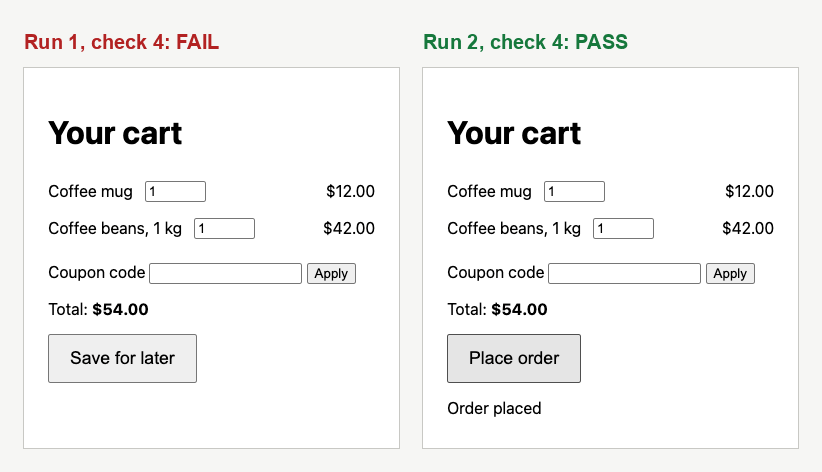
Check 4 at 375 pixels wide, from the agent's saved evidence (cropped). Run 1 shows only Save for later. After the fix, Place order is visible and clicking it shows "Order placed".
Step 4: review the evidence, then grow the checklist#
Review the run the way you would review a colleague's: read the report, open the screenshots, then read the diff. Here the screenshots matched the report, and the diff was small enough to check by eye. The open question was the one the agent raised itself, unknown coupon codes. Turn a review comment like that into a check, so the next run tests it too. We added check 6 to QA.md and widened check 5:
5. No errors in the browser console during any check.
6. Desktop: reload, then apply coupon BOGUS. The status says "BOGUS is not a valid code" and the total stays $54.00.
Then we asked it to make check 6 pass and rerun all six checks into qa-evidence/after-2/. It took 46 seconds. All six passed, with no console messages. The coupon handler now checks for a match before using it:
const match = COUPONS[code.toUpperCase()];
if (!match) {
  document.getElementById('coupon-status').textContent = code + ' is not a valid code';
  return;
}
coupon = { code, percent: match.percent };
One product question is still open. Should a bad code clear a coupon that was already applied? As written, it leaves the earlier discount in place. After the run, Claude Code's suggested next prompt was to make an invalid code clear the applied coupon. The checklist doesn't say what should happen, so it is your call, not the agent's. The checklist is the spec. If a behavior matters, write it down as a check.
Step 5: turn the checklist into a regression test#
An agent session is the wrong tool for a check you want on every pull request: it is slow, it costs tokens, and two runs never go exactly the same way. Once the checklist has settled, have the agent write it as a Playwright test. Then CI can run it with no model involved:
Turn the checks in QA.md into a Playwright test suite so CI can run them without an
agent: tests/checkout.spec.js with one test per check (turn check 5 into a
console-error assertion inside each test), and playwright.config.js with a webServer
entry that serves app/ on 127.0.0.1:4173 and reuses a running server. Run the suite
and report the result. Do not commit.
Our prompt also said that @playwright/test 1.65.1 was already installed and where its browser was, details that only applied to our machine. It took 62 seconds. Here is the heart of the 67-line spec it wrote: check 5 runs as a fixture inside every test, and check 4 runs at phone width:
const base = require('@playwright/test');
const { expect } = base;

// Check 5: any console error or uncaught page error fails the test.
const test = base.test.extend({
  page: async ({ page }, use) => {
    const errors = [];
    page.on('console', (msg) => {
      if (msg.type() === 'error') errors.push(`console.error: ${msg.text()}`);
    });
    page.on('pageerror', (err) => errors.push(`pageerror: ${err.message}`));
    await use(page);
    expect(errors, 'browser console errors').toEqual([]);
  },
});

test.describe('phone (375x812)', () => {
  test.use({ viewport: { width: 375, height: 812 } });

  test('check 4: "Place order" is visible and clicking it shows "Order placed"', async ({ page }) => {
    await page.goto('/');
    const placeOrder = page.getByRole('button', { name: 'Place order' });
    await expect(placeOrder).toBeVisible();
    await placeOrder.click();
    await expect(page.locator('#order-status')).toHaveText('Order placed');
  });
});
The config's webServer entry starts the same Python server when nothing is listening on the port, and reuseExistingServer: true uses one that already is. Without being asked, Claude Code ran the new suite against the original code on a second port to prove it could fail. We checked both results ourselves:
- On the fixed code:
5 passed (756ms). - On the original code, checked out in a separate git worktree: 2 passed and 3 failed. Check 3 expected
"SAVE10 applied"and received"", along with theTypeErroras a page error. Check 6 failed the same way. Check 4 failedtoBeVisible()because no visible Place order button was found.
Claude Code also pointed out a gap: the test's headless browser never asked for /favicon.ico, so the suite would not have caught the original 404. Our run on the original code confirms it. Checks 1 and 2 passed there with no console errors, on a page that has no favicon. An exploratory pass and a test suite catch different things, which is why this recipe keeps both.
After reviewing everything, we committed the fixes, the updated checklist and the suite in one commit: 9 files with 179 lines added and 4 removed, most of them in the spec, the config and the package files. npm test runs the suite, and qa-evidence/ stays out of git.
What it cost#
| Run | What we asked for | Time | Result |
|---|---|---|---|
| 1 | Report only | 56 s | 2 PASS, 3 FAIL, a cause with file and line for each |
| 2 | Fix and rerun | 43 s | 5 of 5 PASS, no console messages |
| 3 | Check 6, then rerun | 46 s | 6 of 6 PASS |
| 4 | Write a Playwright suite | 62 s | 5 tests pass in under a second |
The four turns, all in one session, used 2,207,896 tokens: 84 input, 47,994 cache writes, 2,141,426 cache reads and 18,392 output. Cache reads were 97% of the total. Every request re-reads the conversation, including each page snapshot and screenshot already in it. That is cheap per token, but it adds up on a real app with long pages. On a subscription it draws on your usage limits. Two ways to keep it down:
- Run QA in its own session or a subagent. The main session gets the report back, not every screenshot. Our subagents, agent teams and parallel sessions test shows what each of those costs.
- Send fewer images. Playwright MCP's
--image-responses omitstops images from reaching the model, so the agent works from the accessibility snapshots. Screenshots it saves under a file name should still land on disk for you, but we took this from the README and didn't test it.
Rules to copy for your own app#
- Write expected values, not intentions. Each check names a viewport, an action and the exact text or number you expect.
- Start clean. Use a fresh browser profile and a fresh page load for each run, so leftover state can't make a check pass.
- One named evidence file per check. Also keep the console log, and a table of expected versus observed results.
- Report first, fix second. Review each failure before any code changes. Then rerun the same checklist into a separate folder.
- Treat the console as a check. In our run, the only sign of one problem was in the console.
- Make settled checks into tests. Keep the agent for exploratory passes and for the checks a test suite misses.
Troubleshooting#
| Symptom | Likely cause | Fix |
|---|---|---|
/mcp doesn't list the server, or claude mcp list shows "Pending approval" | Servers from .mcp.json wait for your approval | Run claude in the project, accept the workspace trust dialog, then approve the server |
| The browser never starts | Playwright MCP can't find a browser | Pass --browser or --executable-path; check that Node.js is 18 or newer |
| A second agent's browser fails while the first one runs | Both share one persistent profile | Use --isolated, or a separate --user-data-dir for each agent |
| Screenshots aren't where you expected | Files named in the prompt resolve against the workspace root; auto-named ones go to --output-dir | Name every file in the prompt, as in step 2 |
| The report says "verified" and nothing else | The prompt asked for verification, not evidence | Ask for named files and the expected-versus-observed table |
| The page needs a login | An isolated profile starts with no cookies | Load a saved test-account session with --storage-state, or use Claude in Chrome on a test account |
| Claude in Chrome tools never appear | Signed in with an API key or a setup-token token | Sign in with /login, then run /chrome to check the connection |
| Phone checks pass when they shouldn't | The check never set a viewport | Put the viewport in the check; Playwright MCP can resize the window or start at --viewport-size |
Browser QA in Agentastic#
Agentastic is a Mac app for running Claude Code, Codex and other agents side by side, each in its own worktree, with a built-in browser next to them. The recipe above works unchanged in an Agentastic terminal: Claude Code loads Playwright MCP from .mcp.json as it would anywhere. Agentastic adds a second option, a browser tab the agent drives while you watch. This section comes from Agentastic's browser docs and dev browser reference, checked against the app's code. We didn't run it for this test.
- The agent drives a tab you can see. Agents in Agentastic terminals get
dev browsercommands over a local socket that accepts only your user. While the tab is on screen, Agentastic draws the agent's cursor with a tooltip that says what it is doing. The app draws the cursor; it is never part of the page, so it doesn't appear in snapshots or screenshots. - Sign-ins stay apart. Tabs that agents open use a dedicated Agent profile by default. A setting can give each worktree its own profile, so parallel agents never share a session, or let agents use your own profile when a check needs your sign-ins.
- Two engines. Tabs run on Chromium on Apple silicon Macs, and any tab can switch to WebKit, Safari's engine. Every
dev browsercommand works the same on both, so one checklist covers both engines. - Remote machines. In a repository opened over SSH,
dev browserruns on the remote host with a headless Chromium (remote server 0.9.32 and later). The agent tests the app where it runs, even while your Mac is disconnected. - No viewport command. As of November 15,
dev browsercan't resize a page to phone width; we found no such command in the reference or the app's code. Keep phone-width checks in Playwright MCP.
Here is check 3 from our checklist, written with commands from the dev browser reference (not run):
dev browser open http://127.0.0.1:4173
dev browser wait load
dev browser fill "#coupon" "SAVE10"
dev browser click "#coupon-form button" --intent "QA check 3: apply SAVE10"
dev browser get text "#coupon-status"
dev browser get text "#total"
dev browser screenshot -o qa-evidence/check-3.png
dev browser console errors
To teach an agent these commands, install the browser skill. When an agent needs a whole desktop rather than a browser tab, see computer use for coding agents.
Reproduce the test#
We used Claude Code 2.1.325 with Opus 5.5 in auto mode, Playwright MCP 0.0.85 and @playwright/test 1.65.1 on macOS, with Python 3 serving the page. Create a repository with the QA.md from the top of this guide and these files. The two bugs are in app.js and style.css.
app/index.html:
<!doctype html>
<html lang="en">
<head>
  <meta charset="utf-8">
  <meta name="viewport" content="width=device-width, initial-scale=1">
  <title>Mugshop checkout</title>
  <link rel="stylesheet" href="style.css">
</head>
<body>
  <main>
    <h1>Your cart</h1>
    <ul id="cart">
      <li>Coffee mug <input id="qty-mug" type="number" min="0" value="1" aria-label="Coffee mug quantity"> <span class="price">$12.00</span></li>
      <li>Coffee beans, 1 kg <input id="qty-beans" type="number" min="0" value="1" aria-label="Coffee beans quantity"> <span class="price">$42.00</span></li>
    </ul>
    <form id="coupon-form">
      <label for="coupon">Coupon code</label>
      <input id="coupon" name="coupon" autocomplete="off">
      <button type="submit">Apply</button>
    </form>
    <p id="coupon-status" role="status"></p>
    <p>Total: <strong id="total">$54.00</strong></p>
    <div class="actions">
      <button id="save-later" type="button">Save for later</button>
      <button id="place-order" type="button">Place order</button>
    </div>
    <p id="order-status" role="status"></p>
  </main>
  <script src="app.js"></script>
</body>
</html>app/style.css:
body { font-family: system-ui, sans-serif; margin: 0; }
main { max-width: 640px; margin: 0 auto; padding: 24px; }
#cart { list-style: none; padding: 0; }
#cart li { display: flex; gap: 12px; align-items: center; padding: 8px 0; }
#cart input { width: 4em; }
.price { margin-left: auto; }
.actions { display: flex; gap: 12px; }
.actions button { font-size: 1.1rem; padding: 12px 20px; }

/* On phones, drop the secondary button to save space. */
@media (max-width: 480px) {
  .actions button:last-child { display: none; }
}app/app.js:
const PRICES = { mug: 1200, beans: 4200 };
const COUPONS = { SAVE10: { percent: 10 } };
let coupon = null;

function dollars(cents) {
  return '$' + (cents / 100).toFixed(2);
}

function subtotal() {
  return Object.keys(PRICES).reduce((sum, sku) => {
    const qty = Number(document.getElementById('qty-' + sku).value) || 0;
    return sum + PRICES[sku] * qty;
  }, 0);
}

function render() {
  let total = subtotal();
  if (coupon) total = Math.round(total * (100 - coupon.percent) / 100);
  document.getElementById('total').textContent = dollars(total);
}

document.querySelectorAll('#cart input').forEach((input) => input.addEventListener('input', render));

document.getElementById('coupon-form').addEventListener('submit', (event) => {
  event.preventDefault();
  const code = document.getElementById('coupon').value.trim();
  const percent = COUPONS[code.toLowerCase()].percent;
  coupon = { code, percent };
  document.getElementById('coupon-status').textContent = code + ' applied';
  render();
});

document.getElementById('place-order').addEventListener('click', () => {
  document.getElementById('order-status').textContent = 'Order placed';
});

render();
Our CLAUDE.md had two lines. Claude Code reused the first one for the test server:
- The app is static. Serve it with `python3 -m http.server 4173 --bind 127.0.0.1 --directory app`.
- Don't commit anything under qa-evidence/ unless asked.
Then serve the page, add the browser and start Claude Code:
git init && git add -A && git commit -m "Mugshop checkout"
python3 -m http.server 4173 --bind 127.0.0.1 --directory app &
claude mcp add -s project playwright -- npx -y @playwright/mcp@0.0.85 --headless --isolated --output-dir qa-evidence
claude --model opus
Paste the prompts from steps 2 and 3, edit QA.md as in step 4, then send the step 5 prompt. To run the finished suite yourself:
npm init -y
npm install -D @playwright/test@1.65.1
npx playwright install chromium
npx playwright testSources#
Checked on November 15, 2026:
- Microsoft, Playwright MCP README (flags, tools, profiles) and
@playwright/mcpon npm (version 0.0.85) - Playwright, Web server (
webServerandreuseExistingServer) - Anthropic, Use Claude Code with Chrome, desktop app: preview your app, Connect Claude Code to tools via MCP and the CLI reference (
--mcp-config,--strict-mcp-config) - OpenAI, Browser (where the built-in browser is available for Codex)
- Agentastic, Browser, Browser CLI reference and Browser skill for agents
Frequently asked questions#
Can Claude Code test my web app in a browser?#
Yes. Give it a browser through the Playwright MCP server, the Claude in Chrome extension, or the Browser pane in Claude's desktop app. It can then open pages, click, fill in forms, take screenshots and read the console. In our test it found two planted bugs in 56 seconds and named the file and line for each.
Should I use Playwright MCP or Claude in Chrome for QA?#
Use Playwright MCP when you want a clean, repeatable browser: it can run headless with an in-memory profile and resize the viewport for phone checks. Use Claude in Chrome when the page needs your signed-in session. It drives your real browser with its login state, and it needs a direct Anthropic plan and a /login sign-in.
How do I make the agent prove it tested the change?#
Give it a written checklist with expected values, ask for one screenshot per check plus the console log, and ask for a table of expected versus observed results marked PASS or FAIL. Then look at the screenshots, not just the summary. A report that only says the page loaded hasn't tested anything.
Does agent browser QA replace Playwright tests?#
No. Use the agent for exploratory checks and to write the tests. Once a check matters, make it a test. In our run Claude Code turned the checklist into a 67-line Playwright suite that ran in under a second with no model. It failed on the original code and passed on the fix.
How many tokens does browser QA use in Claude Code?#
A lot, because page snapshots and screenshots stay in the conversation. Our four turns on a two-item checkout page used about 2.2 million tokens, 97% of them cache reads. Run QA in a fresh session or a subagent so your main session stays small.
Can Codex test a web app in a browser?#
OpenAI's docs say the built-in Browser isn't available in the Codex CLI or the IDE extension; it is in the ChatGPT desktop app. The Codex CLI can load the same Playwright MCP server with codex mcp add. We ran this test with Claude Code only.
Can agents in Agentastic use its built-in browser for QA?#
Yes. Agents in Agentastic terminals can drive the built-in browser with dev browser commands: open pages, click, fill in forms, save screenshots and list console errors. dev browser has no viewport command, so keep phone-width checks in Playwright MCP. We checked this against Agentastic's docs and code, not in a run.